

I recently switched from Windows to OS X. I bought a MacBook and I already love it.
The downside is, that I have to build up the complete environment to program AVR microcontrollers again.
This is a write up of things to install and confiure to get the tool chain up and running.
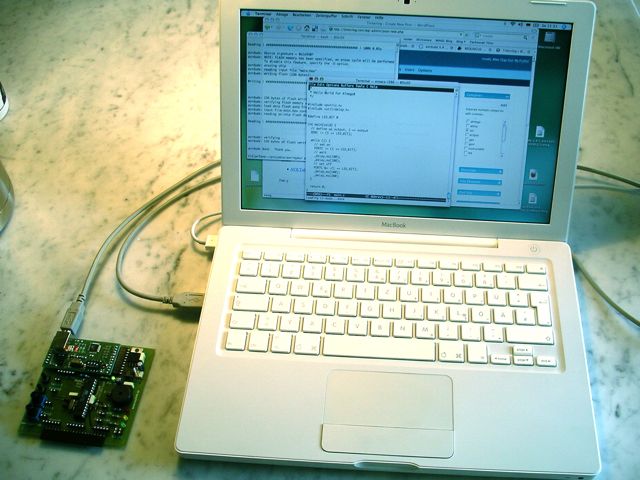
Prerequisites
- Mac OS X 10.4.10
- mySmartUSB programmer
Installation of tool chain
- XCode 2.4.1. This package contains most tools needed for developing for Mac OS X. We need it for make and for the compiler to compile the tools further down. Download it here. Follow the instructions of the installation dialog.
- X11. Following the instructions to install Mac Ports, we have to install X11 first. Install it from the Mac OS X installation CD #1.
- Mac Ports 1.5.0. To be able to fetch and install ported packages, we need to install Mac Ports. Download it here. Be sure to follow the instructions and check, if Mac Ports is working.
- AVR-GCC cross compiler and needed tools and libs. If port is running, issue
sudo port install avr-libc
in your terminal. That will fetch the packages and compile them. - avrdude 5.3.1. I am using avrdude as programmer. To fetch it from Mac Ports, issue
sudo port install avrdude
mySmartUSB Programmer
For my programmer, mySmartUSB, a driver is needed. As the programmer uses the Silicon Labs CP2102 chip for USB-to-UART conversion, an additional driver is needed. It can be found here. After installation a reboot is recommended. The device file is only visible when the programmer is attached to the USB port. Mine is here: /dev/tty.SLAB_USBtoUART.
Test run
After having installed everything I wanted to see if my tools are working as expected. I wrote the “Hello World”-blinking LED program that all of you know. Compiling it works without problems. Programming it, reveals a problem, that I was already familiar with. avrdude was able to talk to the programmer, but complains about
Verify error - unable to read lfuse properly. Programmer may not be reliable.
Again. This time I just used the -u switch to overwrite the warning. My command line looks like this:
avrdude -v -u -p ATmega8 -c avr910 -P /dev/tty.SLAB_USBtoUART -U flash:w:main.hex:i
And it works!
Links
- AVR Tutorial from Lady Ada, great introduction to use a Mac with AVRs.
- mySmartUSB programmer.
 tinkerlog
Another Mac-using AVR dev! Welcome to the club :-) I’ve had good luck using the OSX-AVR distro, but the homepage seems to have vanished.
LikeLike
Matt, the OSX-AVR distribution is available at http://www.digithink.com/OSX-AVR .
LikeLiked by 1 person
Nice to see that you switched and did all the research for me developing with my Mac ;)
Just a sign that I do not have enough time. But perhaps I stick to my Ubuntu VM
Keep up your efforts!
LikeLike
Hi,
I installed Macports fine but when I tried to install:
sudo port install avr-libc
it came back with these errors:
Error: The following dependencies failed to build: avr-gcc binutils
Error: Status 1 encountered during processing.
not sure if you know what it might be, any help much appreciated.
best wishes
boppyer
LikeLike
Hi boppyer,
I hadn’t had that problem. Maybe you can try:
sudo port install avr-binutils
Cheers,
Alex
LikeLike
Hello Alex and all Mac-AVR addicts out there,
as a coincidence I finished my Mac-AVR setup just this week.
I have installed, i.e. compiled the complete avr toolchain following the instructions in the avrlibc manual without a single problem. This way I can twist the sources, actually I am working on some improvements to avrdude.
Presently I use XCode but I will definitively look into eclipse as well.
One tip for Alex: Use butterfly as a programmer and the flashing will go faster. And you get rid of the devicecode problems.
Best regards,
Joe T. Hermann
LikeLike
Hi Alex, thanks for your reply
Still didn’t want to install though :-( I’ve installed these :
The following ports are currently installed:
avr-binutils @2.16.1_0 (active)
avrdude @5.3.1_0 (active)
expat @2.0.1_0 (active)
gettext @0.17_1 (active)
gmp @4.2.2_0 (active)
libiconv @1.12_0 (active)
libusb @0.1.12_1 (active)
mpfr @2.3.0_4 (active)
but for some reason it just wont want to install avr-libc
when i try it comes up with loads of error, ending with:
make[1]: *** [host-darwin.o] Error 1
make: *** [all-gcc] Error 2
Error: The following dependencies failed to build: avr-gcc binutils
Error: Status 1 encountered during processing.
no probs if you can’t help, just wondered if anyone else has had problems with macports installing stuff :-(
LikeLike
Sorry for what I’m sure is a dumb question, but has anyone tried this with the STK500 and a usb to serial adapter? (With success, that is…) :-)
LikeLike
Hi. I am also using a MacBook (since summer 2006, actually) and have been programming AVRs with WinAVR (avr-gcc). I installed Windows XP into Parallels and use a USBasp-type programming device. It works like a charm and I’m able to use the AVR Simulator as well which is a great bonus.
LikeLike
hi! congrat to the whole site! awesome!
someone said (somewhere around here) we need guys like u – that right!
so.. i have a question for you!
i’ve been building small circuits for some time by now, and i recently changed to MAC from PC.. (macbook to be specific)…
i only have USB as you know and i thought i would buy an USB TO PARALLEL cable.. and i could use my “old” parallel port-used ic writer….. hope u understand..
i thought i need the cable.. than i would need a driver for that cable to operate as a paralel port.. wouldnt i?!
or is this even a possible way to “write” my ICs?
since that usb adapter u used ritgh here isnt really available in Hungary.. and its also expensive on amazon……
thanks for helping :)
peter
LikeLike
Hi Peter,
I have never used a parallel programmer, so I don’t know the options.
If ever possible I would go for the USB solution.
Cheers,
Alex
LikeLike
sorry.. ! i ment serial NOT parallel.. :P
my bad.. :S
LikeLike