

Jonathan asked me, if I would like to do a project with him on Braitenberg vehicles. After some research and reading the first couple of chapters in Vehicles: Experiments in Synthetic Psychology, I was hooked in. Here is the first version of a Braitenberg vehicle, powered with two RC-Servos and an Arduino as its brain.
Best of all, it needs no soldering, drilling or hot glue. And if you’ve played already with Arduinos, there is a good chance, that you have already most of the needed parts at home..
Braitenberg vehicles
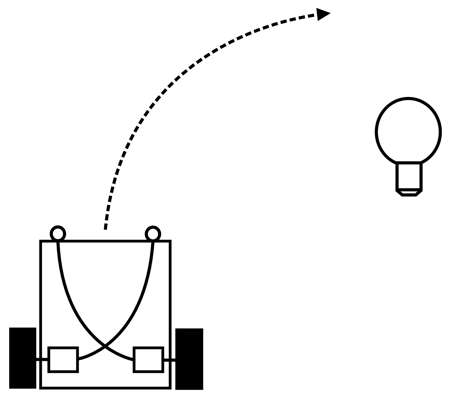
Valentino Braitenberg developed a model of simple vehicles with sensors and actuators (motors) and interconnections between them. While the vehicles are extremely simple, the emerging behaviour is not. It is often interpreted as love, aggression or caution.
The easiest one is a light seeking vehicle. That’s like “hello world” in robotics. The sensors are affecting directly the motors. The right sensor affects the left motor and the left sensor affects the right motor. That means, if light shines on the right sensor, the left wheel turns. And if the light shines brighter on the right sensor, the left motor will turn faster than the left one and so the vehicle will turn towards the light source.
These kind of simple robots can be build with analog techniques alone, they don’t need a microcontroller. Think of two sensors feeding into two amplifiers that control the motors. The big advantage a controller brings in, is the possibility to rewire the connections between inputs and outputs in software. Even more complex functions for the interconnections can be reprogrammed easily.
Needed parts
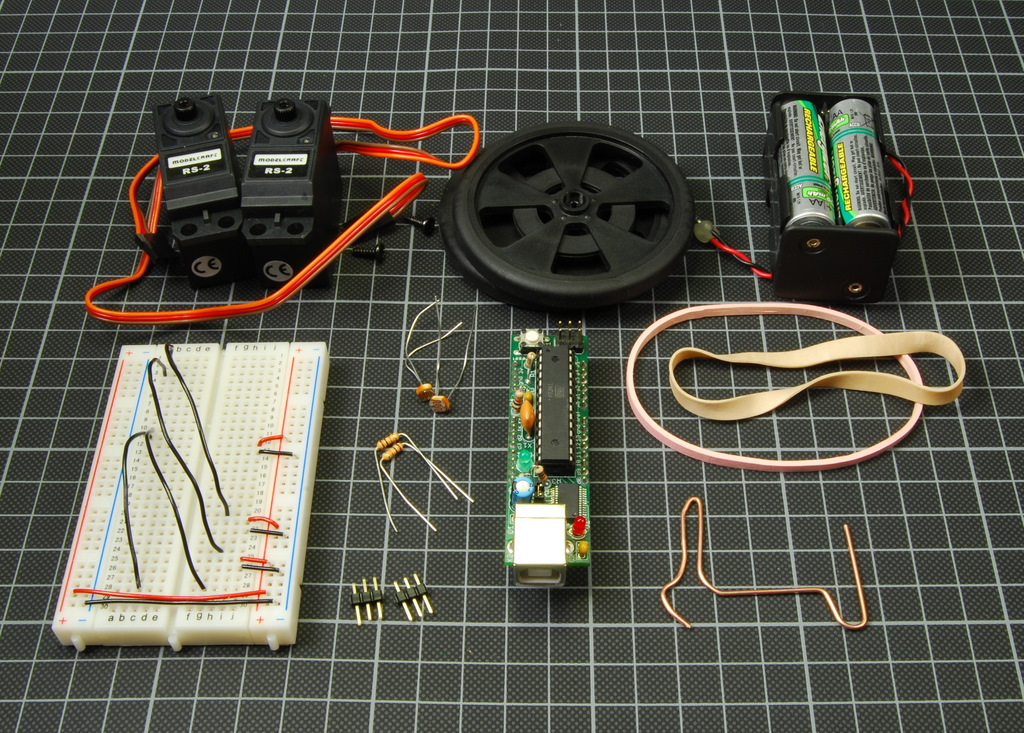
- Arduino board
- small breadboard or prototyping Arduino shield
- 2 RC-servos, can be cheap
- 2 wheels, Solarbotics
- 2 light sensors, LDR (Light Dependent Resistor), e.g. CdS from Solarbotics, and 2 resistors
- 2 3-pin headers
- battery holder and 4 rechargeable batteries
- some rubber bands
- some wires
- paper clip
I am using a Boarduino here, that snaps nicely into the small breadboard. The two wheels are used for convenience. You could use any other type of wheels and attach them to the servos.
The two resistors have to match the LDRs to form a good voltage divider. Otherwise you get only a small range of values out of your sensors. Mine work great with a 10 k resistor.
The servos are hacked. Hacking servos means modifying them for continuous motion. A standard servo moves its tiny arm around from -90 to +90 degrees. But we want them to act as simple motors. There are quite a number of resources out there on how to hack a servo. One of the latest and very good documented one is from Tod. Check out his post about “Tiny Servos as Continuous Rotation Gearmotors”.
Tools
Nothing. Ha, no soldering iron, no drilling and no hot glue! Ok, you need a PC and an USB-cable.
Assembling
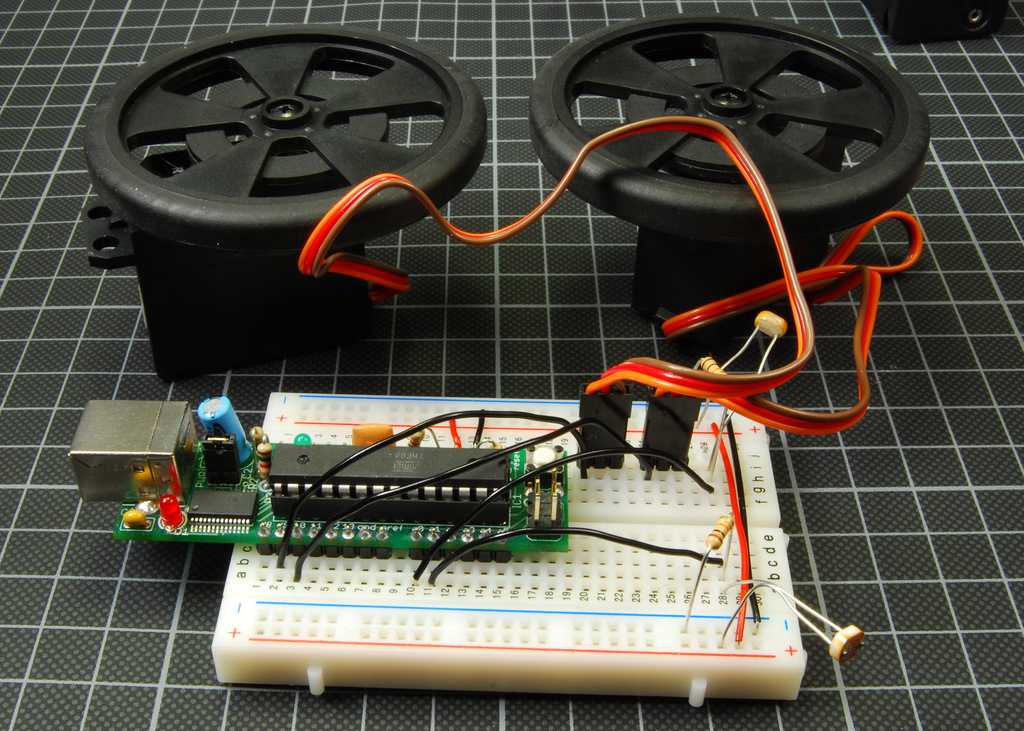
Attach the two servos to the breadboard by using 3-pin headers. Connect the red cable to VCC and the brown one to GND. The orange cable is used to send the control pulses to the servo motor. It is connected to Arduino pin 10 (left) and 9 (right).
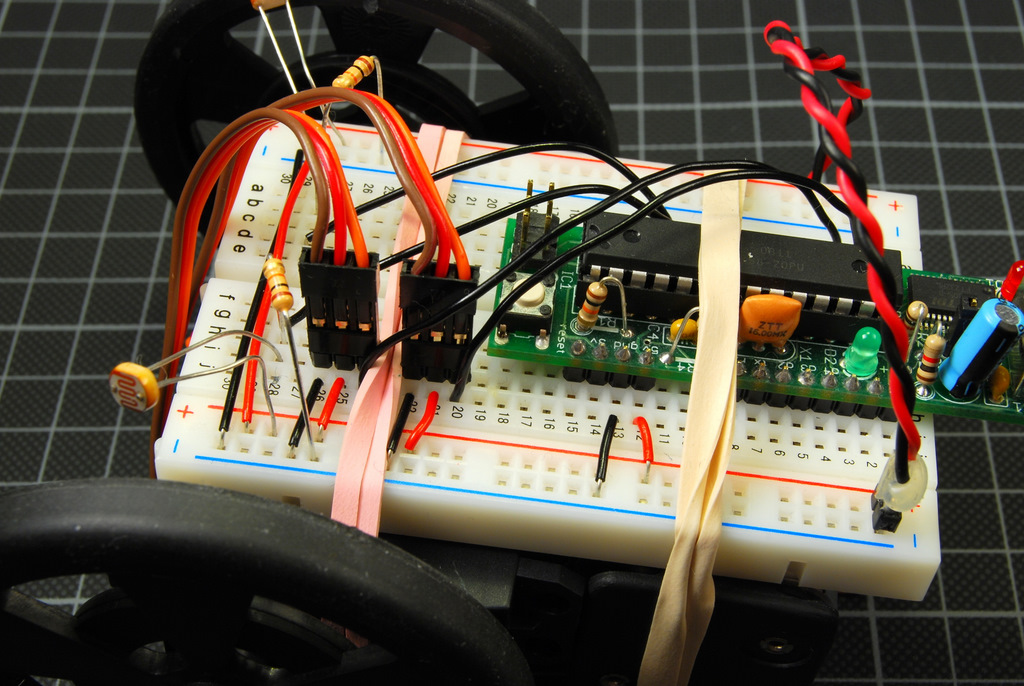
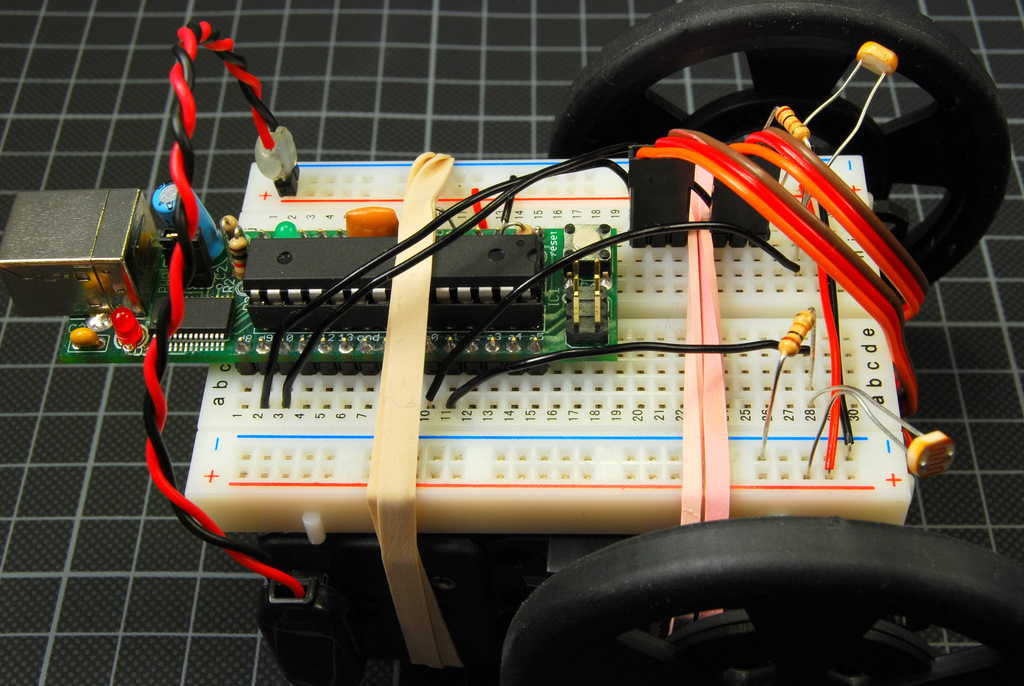
The LDR and the resistor are forming a voltage divider. Connect the LDR to VCC and to a free socket on the breadboard. Now connect the resistor to GND and a free socket of the same row as the LDR. Next connect a wire from this row to the analog input pins of the Arduino (left to analog 0 and right to analog 1).
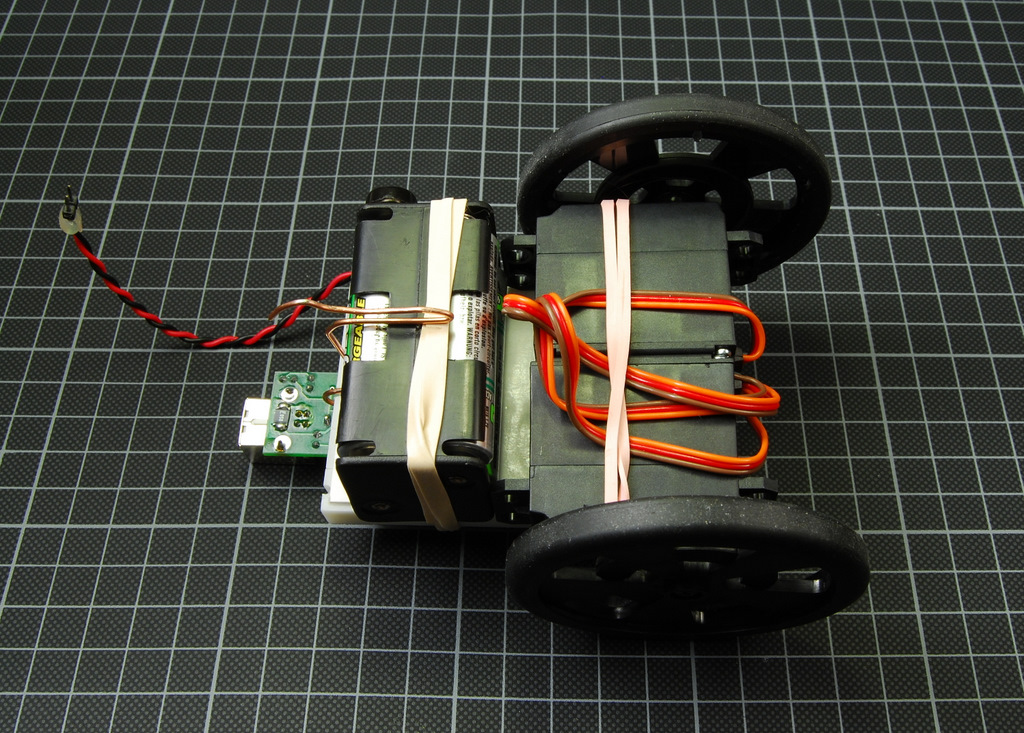
Now take the two servos, put them together and wrap a rubber band around them and the breadboard. Then attach the battery holder to the breadboard and fix it with another rubber band.

Use the paperclip or some other kind of wire to form a small hook. The hook should snap into place and holding the breadboard and the battery holder together. And it has a little notch that is used instead of a third wheel.
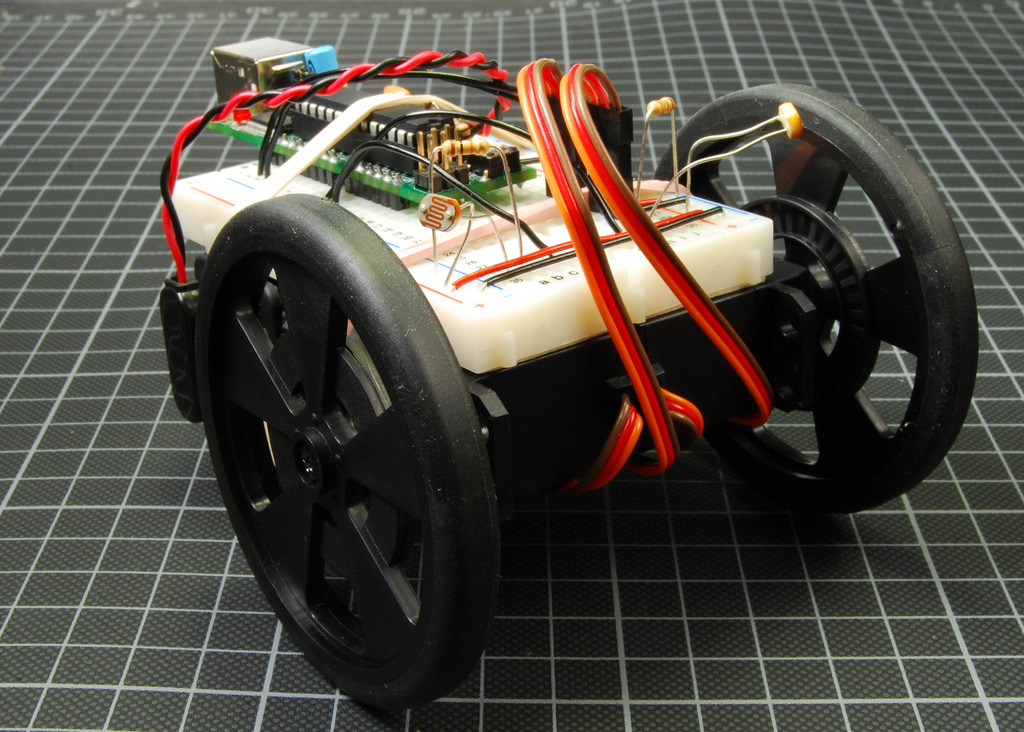
Now this tiny guy is complete.
Arduino Code
/*
 * Simple braitenberg vehicle
 * http://tinkerlog.com
 */

#include "Servo.h"

Servo leftServo;
Servo rightServo;
int leftValue = 0;
int rightValue = 0;

void setup() {
  leftServo.attach(10);
  rightServo.attach(9);
}

void loop() {
  // sensor values between 50..900
  leftValue = (analogRead(0) - 50) / 50;
  rightValue = (analogRead(1) - 50) / 50;
  leftServo.write(89 + rightValue);
  rightServo.write(89 - leftValue);
  delay(10);
}
Yes, that’s all it needs. Only 25 lines of code. Including comments.
The analog values of the sensors are in a range between 50 and 900. So we take 50 as 0 and scale the value down.
The value you send to the servo is the degree it should turn to. From 0 to 180 degrees. At 90 degrees it is centered. For me, 89 is the value at which the left and the right servo stands still. If we add a value, the servo motors spins forward, if we subtract a value, it spins backward. The function for the right servo subtracts the values because it is attached on the opposite side.
You might have to write some simple sketches to evaluate the right values of the sensors and servo motors.
If you plug the USB cable into your PC, it may suck too much power because of the servo motors. You can power it with your external battery pack. Check your Arduino board, most have a jumper for external power supply. Or you unplug the servos for programming.
Play
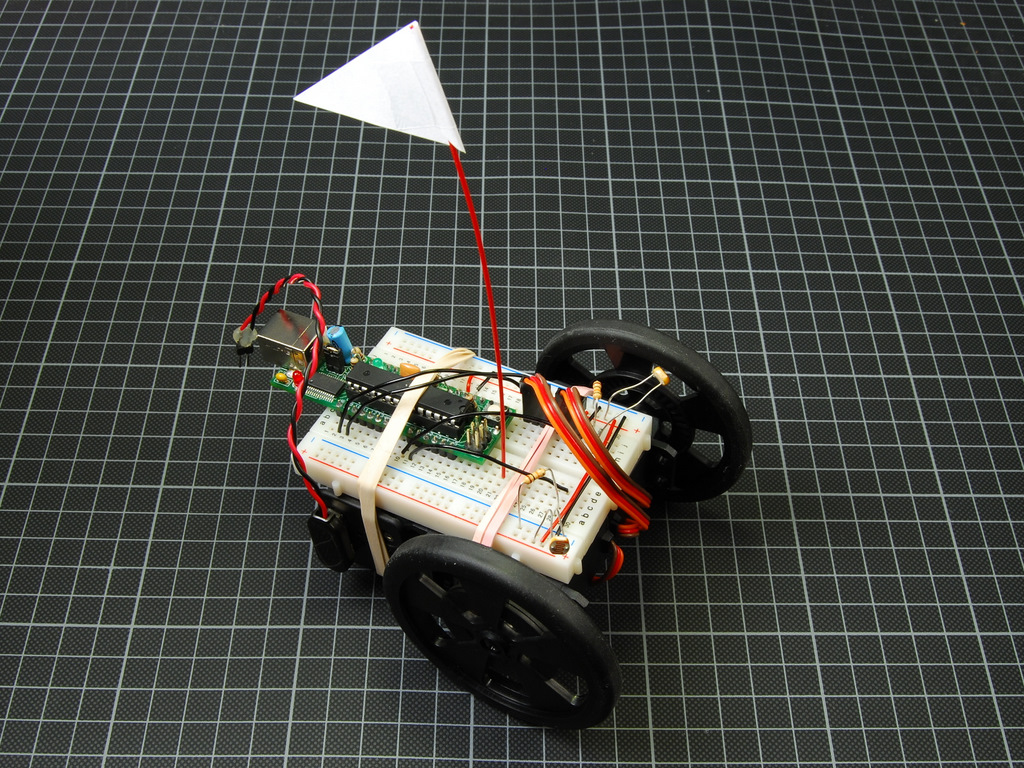
Now switch him on and see if he finds some light sources. It works better, if the rest of the room is dark with only a single light source. I managed to tempt him with a flash light or a lighter. If he seems not to turn as much as he should, try to bend the light sensors more sideways.
This small bot is a bit shaky because of the rubber bands. But he is forgiving. And as he moves around underneath your table, you almost instantly think of him as something that has its own will. Even if you know, that it has only two sensors and two motors.
Links
- Wikipedia: Valentino Braitenberg
- Amazon: Vehicles: Experiments in Synthetic Psychology
- Video of Jonathan’s vehicles
 tinkerlog
Hello,
my own “Braitenberg vehicle” has been finished seconds ago. Your tutorial was really helpful. I’ve got a picture of my version here:
Greetings,
Jan
LikeLike
thank you for share your idea the step by step was very understanding i build my own seeking light bot differrent from yours i was wandering if you have a chance to send me a up grade code that i can use for my seeking light bot .braittenberg your code i past on the ardunio was excellent.and my seeking light bot will runing again thank you
LikeLiked by 1 person
Hello,
First of all thank´s for the detail explanation of the built-up process,
I wanted to know whether the code could be changed for the B.Vehicle to stay still while there are no ligth changes in the surroundings??
Would it be really complicated (I am terrible at code)
Thank´s in advance for your help!
LikeLike
Hi Frank,
you can add certain levels to the code and when the light is below, then do not drive the servos.
Cheers,
Alex
LikeLike