

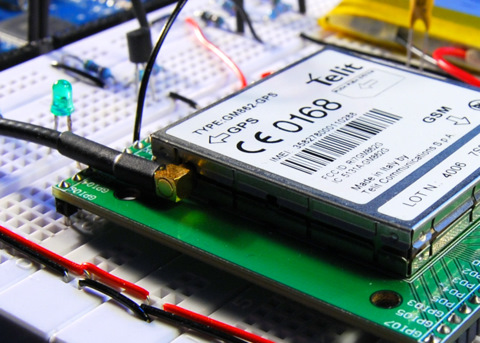
The Arduino can talk over a wide range of networks. Ethernet, Bluetooth, Wifi, XBEE and GPRS to name the most known. I had a Telit GM862-GPS module laying around, unused for some time already. It has GPRS and GPS capabilities, both accessible with AT commands. So I decided to port some of my code to the Arduino.
Schematic
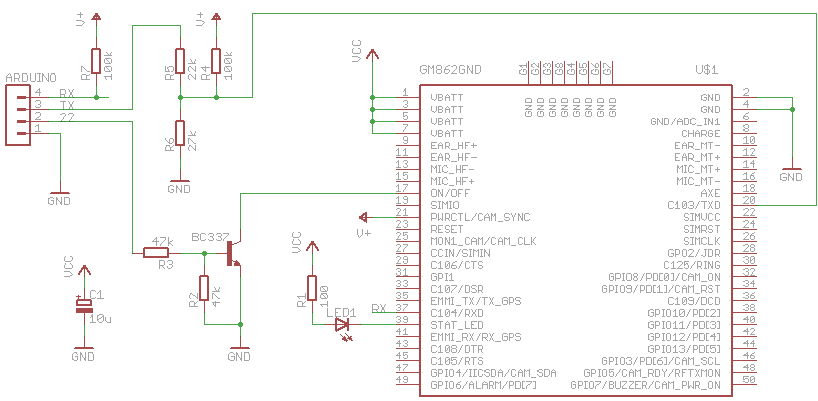
Connecting the Arduino Mega to the GM862 is rather easy. Only four connections are needed.
- Tx3 – Tx
- Rx3 – Rx
- Pin 22 – On/Off
- GND – GND
The GM862 is accessed with a breadboard fiendly breakout board from Sparkfun.
The logic pins of the GM862 accept only CMOS 2.8 Volt. For that reason, a voltage divider is needed for the Tx line. Both, Rx and Tx are pulled up to the PWR_CTL line of the module because these pins don’t have an internal pull up resistor.
The on/off line is connected to ground with a transistor.
The bad thing for this setup is the power supply. The module is powered by a LiPo cell (3.7 V with 2000 mAh). The Arduino Mega is powered by the USB port. If I want to make this portable, I have to use two batteries. Or find a better solution. Maybe powering the Arduino with a step-up converter.
Software
First I wanted to use an Arduino Pro mini, that runs on 3.3 V. That would save me from having two different power supplies for the Arduino and the GM862. I tried to connect the Rx/Tx lines to two digital pins and use the NewSoftSerial library. This library enables a second serial port on the Arduino besides the hardware serial port. Unfortunately it wasn’t reliable enough. Sending to the module seems to work well, receiving sometimes did not. I tried it with different baud rates and different Arduinos, 8 MHz and 16 MHz, but that didn’t help. Maybe I did something wrong, but I couldn’t figure it out.
So I switched to my brand new Arduino Mega. I just connected Rx/Tx to one of the hardware serial ports and it worked immediatly.
The following features are implemented:
- Starting and stopping the module
- Initialization
- Sending of SMS
- Requesting GPS position and parsing the result
- Opening a socket, writing and reading (used to talk HTTP) over GPRS
The software is an really early stage. I focussed most on functionality and less on performance or compact code. The following todos are still open:
- Make debugging output configurable
- Use of PROGMEM to reduce RAM usage
- More compact structure for AT commands
- Parse more responses of AT commands. Some are simply issued, without looking at the response
Nevertheless, here is a small snippet, that shows features that are already working. To get it working, you have to replace XXXX with your PIN. For GPRS you have to dig into the module code and adapt the GPRS settings.
/*
 * GM862-GPS testing sketch
 * used with Arduino Mega
 * http://tinkerlog.com
 */

#include "GM862.h"

int onPin = 22;                      // pin to toggle the modem's on/off
char PIN[5] = "XXXX";                // replace this with your PIN
Position position;                   // stores the GPS position
GM862 modem(&Serial3, onPin, PIN);   // modem is connected to Serial3
char cmd;                            // command read from terminal


void setup() {
  delay(10000);
  Serial.begin(19200);
  Serial.println("GM862 monitor");
  modem.switchOn();                   // switch the modem on
  delay(4000);                        // wait for the modem to boot
  modem.init();                       // initialize the GM862
  modem.version();                    // request modem version info
  while (!modem.isRegistered()) {
    delay(1000);
    modem.checkNetwork();             // check the network availability
  }
  Serial.println("---------------------");
  Serial.println("ready");
}


void requestHTTP() {
  char buf[100];
  byte i = 0;
  modem.initGPRS();                   // setup of GPRS context
  modem.enableGPRS();                 // switch GPRS on
  modem.openHTTP("search.twitter.com");    // open a socket
  Serial.println("sending request ...");
  modem.send("GET /search.atom?q=gm862 HTTP/1.1rn"); // search twitter for gm862
  modem.send("HOST: search.twitter.com portrn");     // write on the socket
  modem.send("rn");
  Serial.println("receiving ...");
  while (i++  0) {            // we received something
      Serial.print("buf:"); Serial.println(buf);
      i--;                            // reset the timeout
    }
  }
  Serial.println("done");
  modem.disableGPRS();                // switch GPRS off
}


void loop() {
  if (Serial.available()) {
    cmd = Serial.read();
    switch (cmd) {
    case 'o':
      modem.switchOff();              // switch the modem off
      break;
    case 's':                         // send a SMS. Replace with your number
      modem.sendSMS("6245", "your@email.com hello from arduino");
      break;
    case 'w':
      modem.warmStartGPS();           // issue a GPS warmstart
      break;
    case 'p':
      position = modem.requestGPS();  // request a GPS position
      if (position.fix == 0) {        // GPS position is not fixed
        Serial.println("no fix");
      }
      else {                          // print lat, lon, alt
        Serial.print("GPS position: ");
        Serial.print(position.lat_deg);  Serial.print(".");
        Serial.print(position.lat_min);  Serial.print(", ");
        Serial.print(position.lon_deg);  Serial.print(".");
        Serial.print(position.lon_min);  Serial.print(", ");
        Serial.println(position.alt);
      }
      break;
    case 'h':
      requestHTTP();                  // do a sample HTTP request
      break;
    default:
      Serial.println("command not recognized");
    }
  }
}
Log
Here is a log, that I recorded within the Arduino IDE. You can see, how
- the modem gets switched on
- the modem gets initialized
- the version info is requested
- it waits until the network is reachable
- a GPS position is requested
- a SMS gets send
- how a HTTP GET is issued over GPRS, it searches for gm862 on twitter
GM862 monitor
switching on
done
initializing modem ...
AT
->ok
AT+IPR=19200
->ok
AT+CMEE=2
->ok
AT+CPIN=XXXX
->ok
done
version info ...
AT+GMI
->buf: AT+GMI
Telit
OK
AT+GMM
->buf: AT+GMM
GM862-GPS
OK
AT+GMR
->buf: AT+GMR
07.02.403
OK
AT+CSQ
->buf: AT+CSQ
+CSQ: 0,0
OK
done

checking network ...
AT+CREG?
->buf: AT+CREG?
+CREG: 0,2
OK
done

checking network ...
AT+CREG?
->buf: AT+CREG?
+CREG: 0,2
OK
done

checking network ...
AT+CREG?
->buf: AT+CREG?
+CREG: 0,1
OK
done

---------------------
ready

requesting GPS position ...
AT$GPSACP
->buf: AT$GPSACP
$GPSACP: 110621.999,5333.9477N,00954.8735E,1.4,66.3,3,22.21,0.10,0.05,150509,08
OK
3
GPS position: 53.565794, 9.914568, 66

sending SMS ...
AT+CMGF=1
->ok
AT+CMGS="6245"
->not ok: AT+CMGS="6245"
>
your@email.com hello from arduino
done

initializing GPRS ...
AT+CGDCONT=1,"IP","internet","0.0.0.0",0,0
->buf:
+CMGS:  35
OK
AT+CGDCONT=1,"IP","internet","0.0.0.0",0,0
OK
AT#USERID=""
->buf: AT#USERID=""
OK
AT#PASSW=""
->buf: AT#PASSW=""
OK
done

switching GPRS on ...
AT#GPRS=1
->buf: AT#GPRS=1
+IP: 10.37.146.251
OK
done

opening socket ...
AT#SKTD=0,80,"search.twitter.com",0,0
->buf: AT#SKTD=0,80,"search.twitter.com",0,0
buf:
buf:
CONNECT
sending request ...
receiving ...
buf:HTTP/1.1 200 OK
Date: Fri, 15 May 2009 11:07:19 GMT
Server: hi
Status: 200 OK
Cache-Control: ma
buf:x-age=20, must-revalidate, max-age=1800
Content-Type: application/atom+xml; charset=utf-8
X-Serve
buf:d-By: searchweb005.twitter.com
Expires: Fri, 15 May 2009 11:37:18 GMT
Content-Length: 4757
Vary:
buf: Accept-Encoding
X-Varnish: 218274860
Age: 0
Via: 1.1 varnish
X-Cache-Svr: searchweb005.twitter
buf:.com
X-Cache: MISS
Connection: close

<?xml version="1.0" encoding="UTF-8"?>
[...]
    </author>
  </entry>
</feed>

NO CARRIER
done

switching GPRS off ...
AT#GPRS=0
->buf: AT#GPRS=0
OK
done
Outlook
Besides some software todos on the list, two things are still bugging me. One is the need of an Arduino Mega because of the hardware serial port. I will try the new version of NewSoftSerial, as soon as it is released. The other thing is the need of two power sources. But that could be solved with the Arduino Mini pro, when the software serial issue is fixed.
Everything else worked well. Now I only need a problem that could be solved with this ;) .
Links and Downloads
- Source code: arduino-gm862.zip
- Interfacing an AVR controller to a GPS Mobile Phone
- GM862 breakout board from Sparkfun
- GM862 specs at Telit.
- roundsolutions, distributor for GM862 modules.
 tinkerlog
this was how i fixed the situation… the multiplication of the minutes was also off, at least for me… I’ve changed the function to this:
/*
* Parse and convert the given string into degrees and minutes.
* Example: 5333.9472N –> 53 degrees, 33.9472 minutes
* converted to: 53.565786 degrees
*/
void GM862::parseDegrees(char *str, int *degree, long *minutes) {
char buf[6];
uint8_t c = 0;
uint8_t i = 0;
char *tmp_str;
tmp_str = str;
while ((c = *tmp_str++) != ‘.’) i++;
strlcpy(buf, str, i-1);
*degree = atoi(buf);
tmp_str -= 3;
i = 0;
while (true) {
c = *tmp_str++;
if ((c == ”) || (i == 5)) {
c = *tmp_str++;
if(c == ‘S’ || c == ‘W’){
*degree = *degree*-1;
}
break;
}
else if (c != ‘.’) {
buf[i++] = c;
}
}
buf[i] = 0;
*minutes = atol(buf);
*minutes /= 6;
}
and now it’s working @least here in Lisbon Portugal
LikeLike
You’re right, thanks for pointing that out.
LikeLike
hi,
is it possible to have access to your GM862.h file?
thank you!
– Eric
LikeLike
i guess my question is – the modem.xxxx(); how is that defined? what is the function modem.xx?
LikeLike
It’s all in the zip file.
LikeLike
Hi there!
I ‘ve started a project for my university on the Telit GM862 and arduino communication.
I managed to send an SMS to my phone, the GSM connects easily (5-6 seconds) but i cannot receive a response to the arduino.
I am connecting the TXD (+5V) of arduino to the TXD of the module using a voltage divider (+2.8V)
I also connect the RXD directly to my Arduino RXD.
I can send from my arduino anything but i cannot receive a thing.
I have uploaded your sketch and everytime i receive “no response” not even the RXD led on the arduino flashes.
I am using an arduino Duemilanove and i am connecting the RXD of the module to the RXD (pin 0) and the TXD to the pin 1 (TXD) of arduino, using a voltage divider.
The module should respond with “OK” if I write on the arduino serial monitor “AT” and press send, right?
Please help me, I am stuck on this for about 2 days.
LikeLike
I am using the command: “GM862 modem(&Serial3, onPin, PIN);”
LikeLike
sorry…the command i am using is: “GM862 modem(&Serial, onPin, PIN);”
LikeLike
Hi Alex.
i recently started on this project and i need your help.
throught an arduino duelmilanove i am communicating with my gm862.i was able to send an sms to my cellphone.
the problem is that i dont have communication from the gm862 to my arduino.
if i udnerstand it all corectly when i send to the telit
Serial.print(“AT”)
i should get an OK Responce from the telit Showing up to the serial monitor right?
well i dont :/ i dont get any responce from the telit to the monitor.
LikeLike
@jimmy, yes, you should read “OK” from the module. If sending works, but receiving doesn’t, then check the rx line again.
LikeLike
@NaThAN maybe try with an Arduino Mega, which has two serial ports.
LikeLike
I managed to make the module communicate. But the only way to test it, is by putting the RX module pin to another serial port, and the transmit from the arduino to my module TXD. Both GRN are connected to my circuit.
Now I can send a lot of commands to my module and receive the correct answer to my PC.
But because I need to make a program that handles some data that’s been received by arduino, I need it to work fully with the arduino IDE (Serial Monitor).
I am using some kind of code but sometimes I receive strange characters that are not making sense. Everytime I receive the correct answer etc.”OK” but its followed by characters.
#include

NewSoftSerial mySerial(2, 3);

void setup()
{
  Serial.begin(4800);
  Serial.println("GM862 testing...");

  // set the data rate for the NewSoftSerial port
  mySerial.begin(4800);
  mySerial.println("AT");


}

void loop()                     // run over and over again
{

  if (mySerial.available()) {
      Serial.print((char)mySerial.read());
  }
  if (Serial.available()) {
      mySerial.print((char)Serial.read());
  }


}
I press the reset button each time.
What I receive to my arduino serial monitor:
[quote]GM862 testing…
EÕÔHèjªHøGM862 testing…
AT
OK
GM862 testing…
AT
OK
GM862 testing…
AT
OK
GM862 testing…
AT
OK
GM862 testing…
Q55RzµÕHøGM862 testing…
AT
OK[/quote]
I need to compare the “text” i receive from myserial to my arduino with another string.
For example, I need to know how to compare what I receive, with the word “OK’ or the word “GM862-GPS” so i make a routine for the program to do some functions if its TRUE.
So I need two things… A code that receives the data and saves it to an array, when it receives the carriage return to make the data as a string, and serila print it to myserial monitor.
The second thing is to compare it with another string. I think that’s easy by using the strncmp() function.
I am trying something like this…
if (mySerial.available() == “OK”) {
Serial.println(” Modem –> OK”);
}
Can someone help me by giving me an example code of what I want to do? Or just fix this one?
Thanks in advance!
LikeLike
Hi, there
really good job over there with code. I would like to thank you in advance. I face a small problem though. I read all the comments related to the pull up resistor on the Rx pin.
Here is what I got: Sparkfun’s USB Evaluation Board, External power supply and the USB untouched. I connect the TXD from the board to Arduino’s Tx and the RXD to Arduino’s Rx. The problem is that I cann’t read the Rx response from the gm862. What should I do?
I haven’t any voltage divider for the TXD pin. When I send commands, modem works fine.
When you say “pull up resistor for the Rx pin”, you mean just connect a 100k resistor like this?…
Rx————-///——Powermon
|
RXD——-
If it’s possible please simplify the schematic.
Thanks alot
LikeLike
Also, some supplementary questioning. Do I have to do something for the 2.8V levels, set up a voltage divider and pull up resistors to make the project work regarding the current hardware that I own at the moment?
I thought having the usb eval board would be easier to interract with arduino. please let me know about it. Thanks
LikeLike