
Tinkerlog header image 2

Tinkerlog

Alex’ blog

Interfacing Arduino with a Telit GM862

May 15th, 2009 · 117 Comments · Arduino, gps, gsm

The Arduino can talk over a wide range of networks. Ethernet, Bluetooth, Wifi, XBEE and GPRS to name the most known. I had a Telit GM862-GPS module laying around, unused for some time already. It has GPRS and GPS capabilities, both accessible with AT commands. So I decided to port some of my code to the Arduino.

Schematic
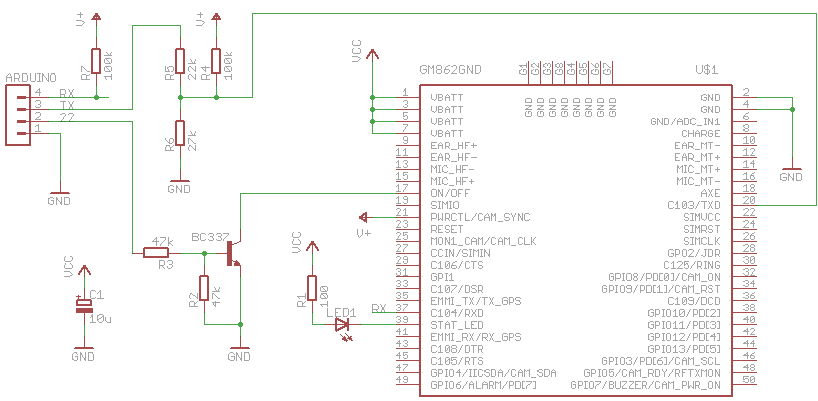
Connecting the Arduino Mega to the GM862 is rather easy. Only four connections are needed.

  • Tx3 – Tx
  • Rx3 – Rx
  • Pin 22 – On/Off
  • GND – GND

The GM862 is accessed with a breadboard fiendly breakout board from Sparkfun.

The logic pins of the GM862 accept only CMOS 2.8 Volt. For that reason, a voltage divider is needed for the Tx line. Both, Rx and Tx are pulled up to the PWR_CTL line of the module because these pins don’t have an internal pull up resistor.
The on/off line is connected to ground with a transistor.

The bad thing for this setup is the power supply. The module is powered by a LiPo cell (3.7 V with 2000 mAh). The Arduino Mega is powered by the USB port. If I want to make this portable, I have to use two batteries. Or find a better solution. Maybe powering the Arduino with a step-up converter.

Software

First I wanted to use an Arduino Pro mini, that runs on 3.3 V. That would save me from having two different power supplies for the Arduino and the GM862. I tried to connect the Rx/Tx lines to two digital pins and use the NewSoftSerial library. This library enables a second serial port on the Arduino besides the hardware serial port. Unfortunately it wasn’t reliable enough. Sending to the module seems to work well, receiving sometimes did not. I tried it with different baud rates and different Arduinos, 8 MHz and 16 MHz, but that didn’t help. Maybe I did something wrong, but I couldn’t figure it out.
So I switched to my brand new Arduino Mega. I just connected Rx/Tx to one of the hardware serial ports and it worked immediatly.

The following features are implemented:

  • Starting and stopping the module
  • Initialization
  • Sending of SMS
  • Requesting GPS position and parsing the result
  • Opening a socket, writing and reading (used to talk HTTP) over GPRS

The software is an really early stage. I focussed most on functionality and less on performance or compact code. The following todos are still open:

  • Make debugging output configurable
  • Use of PROGMEM to reduce RAM usage
  • More compact structure for AT commands
  • Parse more responses of AT commands. Some are simply issued, without looking at the response

Nevertheless, here is a small snippet, that shows features that are already working. To get it working, you have to replace XXXX with your PIN. For GPRS you have to dig into the module code and adapt the GPRS settings.

/*
 * GM862-GPS testing sketch
 * used with Arduino Mega
 * http://tinkerlog.com
 */

#include "GM862.h"

int onPin = 22;                      // pin to toggle the modem's on/off
char PIN[5] = "XXXX";                // replace this with your PIN
Position position;                   // stores the GPS position
GM862 modem(&Serial3, onPin, PIN);   // modem is connected to Serial3
char cmd;                            // command read from terminal

void setup() {
  delay(10000);
  Serial.begin(19200);
  Serial.println("GM862 monitor");
  modem.switchOn();                   // switch the modem on
  delay(4000);                        // wait for the modem to boot
  modem.init();                       // initialize the GM862
  modem.version();                    // request modem version info
  while (!modem.isRegistered()) {
    delay(1000);
    modem.checkNetwork();             // check the network availability
  }
  Serial.println("---------------------");
  Serial.println("ready");
}

void requestHTTP() {
  char buf[100];
  byte i = 0;
  modem.initGPRS();                   // setup of GPRS context
  modem.enableGPRS();                 // switch GPRS on
  modem.openHTTP("search.twitter.com");    // open a socket
  Serial.println("sending request ...");
  modem.send("GET /search.atom?q=gm862 HTTP/1.1\r\n"); // search twitter for gm862
  modem.send("HOST: search.twitter.com port\r\n");     // write on the socket
  modem.send("\r\n");
  Serial.println("receiving ...");
  while (i++ < 10) {                  // try to read for 10s
    modem.receive(buf);               // read from the socket, timeout 1s
    if (strlen(buf) > 0) {            // we received something
      Serial.print("buf:"); Serial.println(buf);
      i--;                            // reset the timeout
    }
  }
  Serial.println("done");
  modem.disableGPRS();                // switch GPRS off
}

void loop() {
  if (Serial.available()) {
    cmd = Serial.read();
    switch (cmd) {
    case 'o':
      modem.switchOff();              // switch the modem off
      break;
    case 's':                         // send a SMS. Replace with your number
      modem.sendSMS("6245", "your@email.com hello from arduino");
      break;
    case 'w':
      modem.warmStartGPS();           // issue a GPS warmstart
      break;
    case 'p':
      position = modem.requestGPS();  // request a GPS position
      if (position.fix == 0) {        // GPS position is not fixed
        Serial.println("no fix");
      }
      else {                          // print lat, lon, alt
        Serial.print("GPS position: ");
        Serial.print(position.lat_deg);  Serial.print(".");
        Serial.print(position.lat_min);  Serial.print(", ");
        Serial.print(position.lon_deg);  Serial.print(".");
        Serial.print(position.lon_min);  Serial.print(", ");
        Serial.println(position.alt);
      }
      break;
    case 'h':
      requestHTTP();                  // do a sample HTTP request
      break;
    default:
      Serial.println("command not recognized");
    }
  }
}

Log

Here is a log, that I recorded within the Arduino IDE. You can see, how

  • the modem gets switched on
  • the modem gets initialized
  • the version info is requested
  • it waits until the network is reachable
  • a GPS position is requested
  • a SMS gets send
  • how a HTTP GET is issued over GPRS, it searches for gm862 on twitter
GM862 monitor
switching on
done
initializing modem ...
AT
->ok
AT+IPR=19200
->ok
AT+CMEE=2
->ok
AT+CPIN=XXXX
->ok
done
version info ...
AT+GMI
->buf: AT+GMI
Telit
OK
AT+GMM
->buf: AT+GMM
GM862-GPS
OK
AT+GMR
->buf: AT+GMR
07.02.403
OK
AT+CSQ
->buf: AT+CSQ
+CSQ: 0,0
OK
done

checking network ...
AT+CREG?
->buf: AT+CREG?
+CREG: 0,2
OK
done

checking network ...
AT+CREG?
->buf: AT+CREG?
+CREG: 0,2
OK
done

checking network ...
AT+CREG?
->buf: AT+CREG?
+CREG: 0,1
OK
done

---------------------
ready

requesting GPS position ...
AT$GPSACP
->buf: AT$GPSACP
$GPSACP: 110621.999,5333.9477N,00954.8735E,1.4,66.3,3,22.21,0.10,0.05,150509,08
OK
3
GPS position: 53.565794, 9.914568, 66

sending SMS ...
AT+CMGF=1
->ok
AT+CMGS="6245"
->not ok: AT+CMGS="6245"
>
your@email.com hello from arduino
done

initializing GPRS ...
AT+CGDCONT=1,"IP","internet","0.0.0.0",0,0
->buf:
+CMGS:  35
OK
AT+CGDCONT=1,"IP","internet","0.0.0.0",0,0
OK
AT#USERID=""
->buf: AT#USERID=""
OK
AT#PASSW=""
->buf: AT#PASSW=""
OK
done

switching GPRS on ...
AT#GPRS=1
->buf: AT#GPRS=1
+IP: 10.37.146.251
OK
done

opening socket ...
AT#SKTD=0,80,"search.twitter.com",0,0
->buf: AT#SKTD=0,80,"search.twitter.com",0,0
buf:
buf:
CONNECT
sending request ...
receiving ...
buf:HTTP/1.1 200 OK
Date: Fri, 15 May 2009 11:07:19 GMT
Server: hi
Status: 200 OK
Cache-Control: ma
buf:x-age=20, must-revalidate, max-age=1800
Content-Type: application/atom+xml; charset=utf-8
X-Serve
buf:d-By: searchweb005.twitter.com
Expires: Fri, 15 May 2009 11:37:18 GMT
Content-Length: 4757
Vary:
buf: Accept-Encoding
X-Varnish: 218274860
Age: 0
Via: 1.1 varnish
X-Cache-Svr: searchweb005.twitter
buf:.com
X-Cache: MISS
Connection: close

<?xml version="1.0" encoding="UTF-8"?>
[...]
    </author>
  </entry>
</feed>

NO CARRIER
done

switching GPRS off ...
AT#GPRS=0
->buf: AT#GPRS=0
OK
done

Outlook

Besides some software todos on the list, two things are still bugging me. One is the need of an Arduino Mega because of the hardware serial port. I will try the new version of NewSoftSerial, as soon as it is released. The other thing is the need of two power sources. But that could be solved with the Arduino Mini pro, when the software serial issue is fixed.

Everything else worked well. Now I only need a problem that could be solved with this ;) .

Links and Downloads

117 responses so far ↓

  • 1 Florin // May 15, 2009 at 21:16

    That’s cool Alex, I’m working on something similar. I’m connecting a GPS module recovered from a broken GPS to an Asus EEE PC, to create a navigation system. Unfortunately I’m short on time, but as soon as I get some free time, I’ll post it on my blog.

  • 2 AlphaBeta // May 16, 2009 at 14:48

    Cool project!

    I saw this: ‘Make debugging output configurable’

    And could not resist linking:
    http://www.arduino.cc/playground/Code/SerialDebugger

  • 3 Alex // May 16, 2009 at 15:21

    Thanks for the input.
    That might help to clear things up.

  • 4 cmetom // Jun 7, 2009 at 20:43

    Cool stuff!

    I have gotten back to thinking about my Telit-related projects just last week, and decided switching to arduino might speed up the software-side of development. Did a quick search and you’ve been doing the same thing!

    I’m going to work with the 3.3V / 8MHz ‘Arduino Pro’ that Sparkfun sells – this should remedy the problem of needing two voltages and a voltage divider for the UART.

    Cheers,
    Tom

  • 5 Alex // Jun 8, 2009 at 08:19

    Hi Tom,
    if you take the Arduino Pro, you still have to take care of the 2.8V level on the logic lines of the telit. But you are right, at least you can have only one supply.
    I choose the Mega mainly because it had more hardware UARTs, which makes it easier to debug.

    Cheers,
    Alex

  • 6 Vincent // Jun 27, 2009 at 16:30

    Just out of cutiossity, when you says send a SMS, does that meen that the Arduino can actualy send an SMS to a cell phone?

  • 7 Alex // Jun 27, 2009 at 16:39

    Yes, that’s what it means.

  • 8 Sumeet Singh Thakur // Jul 10, 2009 at 12:48

    Hi alex,
    thanx for the great article
    I got a breakout board and telit gm862 module
    Connecting everything as per your diagram by making a prototyping kind of shield to fit over arduino mega and telit breakout board on top of shield
    I am powering the arduino mega with usb and telit breakout board with 3.3 volt external supply
    I am not getting any reponse from telit
    It always says -> no reponse . any quick ideas where things must be going wrong ?

  • 9 Alex // Jul 10, 2009 at 14:11

    Hi Sumeet,
    the Arduino Mega should be powered with 5V or more. I’m not sure if it would run reliable with 3.3V.
    Cheers,
    Alex

  • 10 Open_Sailing // Jul 13, 2009 at 19:11

    [...] Interesting References – GM862 Cellular Quad Band Module – http://note19.com/2008/12/20/how-to-control-gm862-from-arduino/http://tinkerlog.com/2009/05/15/interfacing-arduino-with-a-telit-gm862/ [...]

  • 11 Interfacing Arduino with a GSM-GPS Modul - Electronic Circuit and Microcontroller Project // Jul 17, 2009 at 11:59

    [...] Arduino and Telit GM862 More detail Arduino and Telit GM862 Project tinkerlog.com [...]

  • 12 Hector Pinedo // Aug 14, 2009 at 21:23

    Hi alex,
    I got a breakout board and telit gm862 module
    Connecting everything as per your diagram by making a prototyping kind
    I am not getting any reponse from telit
    I send AT and anything came from the telit module
    The status LED flashe a couple of times and after he keep off. Is like the module never power on.
    Any clue?

  • 13 Alex // Aug 15, 2009 at 09:24

    Hi Hector,
    be sure your power supply can handle peaks of about 2 amps. These are coming if the module tries to connect the network.
    Cheers,
    Alex

  • 14 Matt // Sep 2, 2009 at 03:07

    It should be possible to reliably use the Arduino Pro with the GM862 if you use the hardware UART for communicating with the GM862 and a softserial serial port for sending the debug messages. You would either use two TTL to serial/usb adapters (one for programming, the second for debugging) and break the hardware UART’s RX line from the main programming serial adapter after programming the Arduino (necessary to allow the GM862 control of the Arduino’s UART RX line) or use one serial adapter and move it from the programming/hardware serial port to the softserial port every time you update the Arduino program.

  • 15 Trent Lloyd // Sep 8, 2009 at 19:04

    For everyone that has no luck with this.. I”ve tried this and a few other schematics with my GM862 and simply had no love at all.

    I sent it back to SFE for warranty but they said it’s fine so seems this module is super sensitive.. I even checked the outputs with a CRO.

    I am going to get a MAX3232 and try that since it worked on a sparkfun rs232 breakout board apparently.

    Just thought I’d let you others know!

  • 16 Marek // Sep 25, 2009 at 23:02

    Very cool Alex! Thanx.
    I’m a bit new to this and I trying ot understand your library GM862. Since you are using an Arduino Mega, why do you use HardwareSerial objects? and not rather Serial1 or Serial2 from the Arduino language?
    Cheers, Marek

  • 17 Alex // Sep 26, 2009 at 07:48

    Because I can ;)
    No seriously, the Mega has 4 serial ports in hardware. These are always preferable over serial ports in software, mostly because the software solution costs more computational power.
    Cheers,
    Alex

  • 18 Marek // Sep 28, 2009 at 19:30

    I agree with that hardware serial ports are better that software ones, but… my question was rather why do you use a library to have access to HardwareSerial objects… instead of using the solution provided by arduino language: Serial1
    Mabe to make myself clear:
    You use: GM862 modem(&Serial3, onPin, PIN);
    [...] modem->print(message);
    Why not, simply: Serial3.print(message); ?
    Thank you for your help! Marek

  • 19 Alex // Sep 28, 2009 at 20:21

    Ah, ok, I see.
    I used that to be able to connect the modem to any of the available serial ports, without having to replace every Serialx with Serialy.

  • 20 Marek // Sep 28, 2009 at 22:02

    This makes everythink clear. Thank you for your code. It has been of great help to understand how everything works. MAREK

  • 21 Mario // Oct 8, 2009 at 13:33

    hello im from brazil and a making a project like this in my curse conclusion work, but i using a siemens modem, so i use a max232 to converto to ttl, my ask is about gps position u declare “Position position” the arduino have a bibliotec about gps positions?

  • 22 Dane // Oct 14, 2009 at 18:55

    Is the telit module capable of making and receiving calls?

    response would be awesome

  • 23 Alex // Oct 16, 2009 at 18:00

    Yes, it is. You can check the datasheet for more details.

  • 24 Alex // Oct 16, 2009 at 18:08

    Mario, Position is defined in GM862.h.

  • 25 ruZZ.il // Oct 19, 2009 at 01:59

    Great stuff! :) I’ve just been researching the 862 as a module of a project, likely to be paired with the Arduino Mega, too. Kind of going OnStar-ish. Glad to see your progress.

  • 26 manson // Nov 13, 2009 at 12:30

    Hi Alex,
    This page that you made is sooooooo helpful!! Thanks a lot, but I have a question though. When I put the ON signal to the telit, I am supposed to wait until a message “DONE” is received or what message is received when it is turned on successfully?

    One last thing, as I connected the module to the 3.3 volt, there was a led on the mikroelektonika board that turned on, and for the on signal I just put a a grounded push button, and then I clicked on it for more than one second and then removed my hand. But no luck when I try to call the module as the operator says that the phone is turned off or not available. so is there like a special command that I should send after I turn it on or what?

    Thanks!

  • 27 Alex // Nov 13, 2009 at 20:05

    Hi manson,
    the code does not really check, if the modem gets turned on, it just pulls the ON/OFF line down.
    Switching in on with a simple button should work, maybe 3.3V is not enough, the modem is specified for about 3.7V.
    Cheers,
    Alex

  • 28 manson // Nov 14, 2009 at 14:37

    Thanks Alex for your fast reply,
    I did as you told me and I connected 3.8v to the module, and I also connected the STATUS_LED to 1 kohm and then to the 3.8v but when I plug in the power, and press on the switch for 1 to 2 seconds and release the STATUS_LED doesn’t flash at all, does this happen to you as well or not??

    And how can I connect the PWRMON pin to a LED to see if the module even turned on or not??

    THANKS MAN!!

  • 29 manson // Nov 14, 2009 at 15:05

    Once Again!!
    I did a mistake, as I connected a 1kohm with the LED… HOW STUPID AM I!! :D :D
    Now, when I put the ON Signal low for one second the the LED_STATUS goes blinking……
    AWESOME
    But it blinks for 5 or 8 times and then after that it turns off. And in the datasheet it says it should blink every 3 seconds.. So what is wrong here???

    YOU ARE THE MAN ALEX!!!
    THANKS soo much for your help

  • 30 Alex // Nov 14, 2009 at 17:44

    Hi manson,
    after starting the module, it tries to connect to the GSM station. For that it needs up to 2 A. If your battery is not able to supply that current, the module turns off.
    Cheers,
    Alex

  • 31 Arduino GPS and GPRS Interface // Nov 17, 2009 at 11:27

    [...] For more information, please visit this page. [...]

  • 32 Seymour // Nov 19, 2009 at 13:06

    Hi,
    Does anyone know if there is a source of cheaper breakout board (inc. connector) for GM862-GPS compared to Sparkfun’s ?

  • 33 Seymour // Nov 20, 2009 at 13:43

    Hi,
    I got a breakout board from Sparkfun and a GM862-GPS and try a simplest circuit to see if it boot up. The test configuration has 3.8V power supply (current limit at 3A) connect to Vcc, all other pin are open and a switch is connect from On/Off to ground. It doesn’t run when I push the switch (current is still zero). I also try the same test config with DTR pull-up and RTS pull-down by 1Kohm (to mimic the behavior on eval board), but the module still doesn’t run. The same GM862GPS module works OK on Sparkfun USB eval board. If I use the USB eval board as a stand-alone and feed 3.8V to Vcc pin, everything is OK (power suplly shows about 40-70mA idle). Does anyone know what could be the problem? Does it mean the connector on the breakout board is bad (it’s a brand new one I just got from Sparkfun)?
    Thanks a lot and happy tinkering,
    Cheers
    Seymour

  • 34 Alex // Nov 20, 2009 at 15:59

    Hi Seymour,
    do you have all VCC and GND pins connected?
    Cheers,
    Alex

  • 35 Seymour // Nov 21, 2009 at 10:26

    I got the breakout board up and running. The culprit is a tiny piece of tape sticking inside the connector. I guess this is what called “vacuum pick-up tape”. The USB eval board doesn’t have it (both board came in the same box), the breakout board does. After removing it everything is OK.
    Does anyone know a source of cheaper breakout board ($30 is a bit high and I need a few dozens) and cheap GM862, with and without GPS?
    A more general question is that if we have a new design with GSM and/or GPS now, which options should we use? Out of GM862, I’m also playing with Libelium Arduino GSM shield (based on Sagem Hilo module) and a few GPS modules (MTK, SIRF, Skytraq chipset) from Sparkfun and others. The size of Sagem Hilo is amazing (~1/3 the surface of GM862) but again, with my limited soldering and PCB skill I will need breakout board for it too if I decide to go with it.
    Thanks all and happy tinkering,
    Cheers,
    Seymour

  • 36 James // Dec 13, 2009 at 22:45

    Hi
    thanks alot for this topic

    I have one problem after connecting everything
    the led blinks after turning it on for 6-9 times and it shutdown directly after that

    I supplied 3.8v and the current around 2.2 A

    I am afraid of connecting it to more current because I didn’t find the maxcurrent in the gm862 dtasheet

    so is it a power problem!

    can you please suggest something to fix this problem?

    Thanks again

  • 37 Alex // Dec 14, 2009 at 01:20

    Hi James,
    another thing that often goes wrong, it the capacitor behind your regulator. This one has to have a low ESR value to be able to supply the current fast enough.
    Cheers,
    Alex

  • 38 Peter // Dec 17, 2009 at 11:12

    Hi,
    I wanted to try this code (I use arduino 0017) but I can’t compile it? I get this:

    o: In function `GM862::isOn()’:
    multiple definition of `GM862::isOn()

    Any idea what went wrong? By the way, if I don’t want to use serial “feedback”, can I write the responds to a LCD so I don’t need arduino mega?

    Regards,
    Peter

  • 39 Alex // Dec 17, 2009 at 11:50

    Hi Peter,
    works for me, just re-verified (on OSX).
    Maybe accidently mangled one of the include lines?
    And yes, it should be possible to use a Duemilanove, but then you have to rewire your setup for every upload.
    Cheers,
    Alex

  • 40 3dotter // Jan 7, 2010 at 14:49

    Hi Alex,

    Did you already try the same with the newest NewSoftSerial library (instead of 2 hardware serial ports)? Would be very interesting! What changes are necessary in your code when using this?

    Best wishes,
    3dotter

  • 41 Alex // Jan 8, 2010 at 12:19

    Hi 3dotter,
    no, I’m sorry, haven’t tried that yet.
    Cheers,
    Alex

  • 42 Donato Colantonio // Jan 11, 2010 at 08:02

    Hi , could i use an Arduino duemilanove with this scheme? I have to change serial3 with serial , it is right or i am costrettoforced to use an Arduino mega?thanks Donato

  • 43 Franck // Jan 25, 2010 at 12:45

    Hi Alex,
    Same that Peter, I ‘m trying the code (I use arduino 0017) I get this: o: In function `GM862::isOn()’:
    multiple definition of `GM862::isOn() /tmp/build6991673787891400230.tmp/test_gm862/GM862.cpp.o:/home/me/Desktop/arduino-0017/hardware/libraries/test_gm862/GM862.cpp:12: first defined here

    Any idea what went wrong?
    I’m using too an Arduino mega and a telit gm862 gps.

    Thanks for your help.

    Franck

  • 44 Alex // Jan 26, 2010 at 00:12

    Hi Franck,
    I think I know what went wrong. Although this looks like a lib, it is not. Well, it could be.
    Please place all files in another directory (not in /arduino/hardware/libraries) and it should compile fine.
    Maybe, if I find some time, I will make it a real library.
    Cheers,
    Alex

  • 45 jpizarro // Feb 23, 2010 at 00:33

    Hi, great work.
    what are V+ and Vcc in the diagram.
    I don`t know to wich power source must connected.
    Thanks

  • 46 Donato // Feb 25, 2010 at 21:28

    Hi, i am not able to connect my arduino mega to GM82. Could you explaine me the difference between V+ and Vcc because i receive always
    checking network …
    AT+CREG?
    ->buf: AT+CREG?
    +CREG: 0,2
    OK
    done

    checking network …
    AT+CREG?
    ->buf: AT+CREG?
    +CREG: 0,2
    OK
    done

    I don’t understand what the problem is.

  • 47 Alex // Feb 25, 2010 at 23:23

    All V+ lines are connected to pin 21 of the Telit module. VCC is connected to a 3.8 V power supply (lipo cell).
    For the CREG problem, is the network available if you put the SIM into your mobile?

  • 48 Alejandro // Mar 28, 2010 at 17:11

    Hi Alex,

    I was wondering if you knew how to change this line of your code:
    GM862 modem(&Serial3, onPin, PIN);

    so that it can be used on an arduino duemilanove. I know there is only one hardware serial port on this board, so I tried replacing “&Serial3″ with &Serial, Serial, &Serial0 but I cant seem to find the correct syntax.

    Thanks in advace for your help.

  • 49 Alex // Mar 28, 2010 at 17:34

    Hi Alejandro,
    GM862 modem(&Serial, onPin, PIN);
    works for me.
    Cheers,
    Alex

  • 50 Alejandro // Mar 28, 2010 at 21:57

    When I try that, I receive the following error message:

    o: In function `main’:
    undefined reference to `GM862::GM862(HardwareSerial*, unsigned char, char*)’

    Any ideas what I could be doing wrong?
    Thanks

  • 51 Alex // Mar 28, 2010 at 22:28

    As noted above, are the sketch, GM826.cpp and GM862.h in the same directory?

  • 52 Alejandro // Mar 28, 2010 at 22:46

    Nevermind, it was some random bug, the code compiled. Thanks again!

  • 53 Jim // Apr 2, 2010 at 20:21

    I desperately need some help with my project. I have a Telit GSM/GPS unit and need to interface it with a PIC board. I have code written in basic and need the Telit module to work with the PIC board I have. I would appreciate any help given.

    Kind regards,
    James Hood.

  • 54 Dee // Apr 23, 2010 at 08:16

    Can I do this project with a arduino atmega328?

  • 55 Visual Micro // May 2, 2010 at 00:25

    Great project thanks.

    By the way I use the lithium backpack from Liquidware (not connected to me). Their backpacks step up 3.3v to 5v and provide both 3.3v and 5v supply pins. Can be recharged from usb or ano source.

    Finally, if you would like to use Visual Studio to program arduino pick up a copy of Visual Micro. It’s free and the intellisense works well with your code.

  • 56 Alex // May 13, 2010 at 18:18

    I would guess about one gps request + http post per second.

  • 57 Biagio // May 13, 2010 at 20:22

    Hello,
    do you know with this “snipped” what is the maximum frequency for sending the gps position through Http? I mean in a second
    how many times I can read gps position and
    make http request roughly?
    Kind regards
    Biagio

  • 58 Telit GM862-GPS and AT commands // Jun 7, 2010 at 02:59

    [...] http://tinkerlog.com/2009/05/15/interfacing-arduino-with-a-telit-gm862/ [...]

  • 59 Mitch // Jul 6, 2010 at 00:59

    Great article! I’m looking for a pre-paid phone to use the sim out of. Do you have any idea what service providers out there support the “mobile web” and SMS at a decent price?

    I have a semi-permanent idea and need some service that won’t break the bank.

  • 60 TCB13 // Jul 13, 2010 at 14:47

    Hi, everyone, first of all great post about arduino and tellit, but I’ve a problem!

    How can I use my telit and arduino in order to have a port allways opened to the internet waiting for connections?

    I’ve tried to do this, using the socket listen AT command, but seems like I can’t use it the right way…

    The first try out was:

    Send the following to the modem:
    AT#FRWL=1,[my-ip],255.255.0.0 -> Add my ip to accepted list
    AT#SL=2,1,1001 -> Open the socket for listen connections…

    It works fine that way, but when I change my ip, the ip is not authorised and the connection is rejected…

    So… I read a little bit of the AT commands reference guide, and I tried this:

    Send the following to the modem:
    AT#SCFG=2,0,0,5000 -> Basic Socket Config (OK)
    AT#SCFGEXT=2,0,0,0,1,0 -> Extended config, supposedly auto-accept connections mode… (ERROR)
    AT#SL=2,1,1001 -> Open the socket for listen connections…

    I don’t know why an error happens, when I try to configure the socket to auto-accept all connections… What should I do? What am I missing?

    Thanks!
    Help please!

  • 61 CorSec Eng // Jul 20, 2010 at 19:37

    Having the same problem with the auto answer. I’ll post any fixes if I find some.

  • 62 Rui // Jul 30, 2010 at 11:46

    Hi all.

    First, let me thank you Alex for providing the source code. I think you should post this project in arduino.cc. I came across your blog only after searching lots of pages with incomplete info.

    My goal is to connect my siemens S55 to arduino and send SMS at pre-set triggers, using AT gsm comand .

    Tryed to use the Fbus, on nokia 3310, but it was really anoying to make it to work.

  • 63 Tim // Aug 31, 2010 at 08:53

    Hi Alex,
    Thanks for tall of the good work with the 862, do you have any plans to update your parsing routine, to add minus characters to the gps coordinates when there is a south or west to deal with ?

  • 64 Van // Sep 8, 2010 at 12:59

    Hi Alex,

    This is really great stuff. How easy is it to receive SMS messages?

  • 65 Ryan O'Hara // Sep 9, 2010 at 04:11

    Alex, thanks for the code it helped in my project with “Twitter Tracker”.

    http://hackaday.com/2010/09/08/location-tracking-with-twitter-and-google-maps/

    http://ohararp.com/wp/?p=119

  • 66 FireBALL // Sep 14, 2010 at 10:44

    Hi Alex,

    Thank you for the great project. I want to make a gps tracker for my dog. I would highly appreciate if you could kindly let me know how to change the SMS feature to GPRS feature. I would like the tracking information send through internet rather then the SMS.

    thank you in advance for your time and help

    cheers

  • 67 Eduard // Oct 5, 2010 at 21:12

    Hi,
    I found a shield for the GM862, it uses a virtual serial port to communicate to the modem. I think the store is from Chile.

    here is the link http://www.olimex.cl/product_info.php?products_id=733
    [img]http://www.olimex.cl/images/MCI-TDD-00733.JPG[/img]

  • 68 Jim // Oct 16, 2010 at 02:13

    Hi Alex,
    I am contacting you in regards to a couple of GM 862 modules I have. I have to consrtuct a circuit using one of the modules in conjunction with a zigbee mesh network. I also have a PICAXE 40 pin development board, a programming interface and a PIC 16F877A processor. I desperately need some technical advice for my project and I am very willing to pay for this and purchase parts. I eagerly await your reply.

    Kind regards.

  • 69 Alex // Oct 16, 2010 at 08:47

    Hi Jim,
    I’m sorry but I have no experience in PIC programming.
    Cheers,
    Alex

  • 70 Andrew // Oct 17, 2010 at 17:14

    Hi Alex,

    I am trying a similar setup. Arduino and Telit gm862. I can send commands from Arduino to Telit (like send sms) and it’s working. But I can’t get anything back. For example, if I send “AT” from Arduino to Telit, I want to read the “OK” on Arduino. Well, this doesn’t work, i don’t get anything back and I tried *everything*! Can you help a little, please?

  • 71 Alex // Oct 17, 2010 at 19:10

    Hi Andrew,
    double check if you have connected the RX pin correctly and if you have the pull-up resistor in place.
    Cheers,
    Alex

  • 72 Andrew // Oct 18, 2010 at 00:12

    Thank you for answering, Alex. Yes, I noticed the RX is the problem, if I disconnect it, I can still send AT commands from Arduino to Telit.
    Do I need to use a pull-up resistor? I just hooked a wire between :-s. Also, I power the Telit with 9V external source and Arduino with the USB cable.
    Thank you so much, Alex, I really appreciate any help you can give me.

  • 73 Alex // Jan 4, 2011 at 23:10

    No, sorry. But take a look at supertweet. I used them lately and it worked fine.

  • 74 regie // Jan 5, 2011 at 00:12

    hi, is there an update to your code because the twitter had transition from Basic Auth to OAuth.

  • 75 Marcelo // Jan 6, 2011 at 13:40

    Hi Alex and people,

    I’m trying to establish connection between the Telit module and a server.
    I’m using the same commands as the GPRS part (Initializing GPRS, swtching on the GPRS,..) and averything is fine.
    But when I try to open the socket sending the command “AT#SKTD”, I keep waiting the answer and don’t get anything. When I send another command (AT for example), I got the answer “+CME ERROR: timeout in opening socket”.
    What should I do? Is there anything missing? Or the time to open the socket is very large?

    Thanks in advance,
    Cheers,
    Marcelo

  • 76 JC Rivera // Jan 12, 2011 at 19:16

    I find this really interesting since Ive been doing some research to do a DIY GPS Tracking system for my car. Does this works without the need of a Cellphone Career? Is there a posibility of mapping the coordinates you get into Google maps/earth/latitude?

    Im really interested in this project (even though im not too hardware-savvy

  • 77 Alex // Jan 19, 2011 at 08:20

    You always need a carrier. Using coordinates with Google Maps is done here: http://tinkerlog.com/2007/07/28/using-google-maps-with-a-mobile-gps-tracker/

  • 78 Matt // Jan 31, 2011 at 04:40

    Hey. Thanks for the writeup.
    Is there a reason you didn’t use a simpler resistor divider to transition 3.3 to 2.8? Something like R1=100k R2=18k?

    This might be explained on the Trackbox2 page but I cannot read German.
    Thanks!

  • 79 Alex // Jan 31, 2011 at 08:24

    Hm, you won’t get 2.8V out of a voltage divider with 100k and 18k.
    I just looked at what resistors I had lying around and what would fit.

  • 80 Jason // Feb 13, 2011 at 08:25

    Alex, what are you using for antennas?

    Thanks!

    Jason

  • 81 Ian // Feb 14, 2011 at 13:50

    Hi guys,

    I’m looking at this with the intention of using it to track a high altitude balloon. Got an arduino mega board and was wondering if anyone could help me out by recommending the necessary hardware for this type of application. I’m somewhat amature when it comes to electronics!

    Cheers

  • 82 Alex // Feb 15, 2011 at 18:34

    @Jason, I bought the module with all needed antennas from roundsolutions.de. They told me, what to use.
    @Ian, I would suggest to look at sparkfun. They have great stuff and very helpful forum.

  • 83 Jona // Feb 16, 2011 at 01:24

    i’m just researching and trying to sort out some things for a mobile project…

    first of all even though i didn’t put my hands on yet i think this is an awesome tutorial alex – thanks a lot for your efforts.

    as my project definitely has to be mobile and of course as small as possible the arduino mega is not really an option for me so i am wondering if anybody made this circuit working with the arduino pro mini 3.3V (http://www.sparkfun.com/products/9220)

    thanks jona

  • 84 Aayush Ahuja // Mar 12, 2011 at 19:32

    HELP NEEDED:::::::

    we are making a project in which we have to connect a gps module and gsm module to an arduino microcontroller.
    the co-ordinates would be extracted from gps and sent to a server through sms. we dont have much knowledge about it. plz help in any way you can.

    The telit gm862 is not available here around.
    Please suggest a economical alternative.

  • 85 vivek the ghot // Mar 12, 2011 at 19:39

    I dont have much funds for a similar project….can u suggest a way out

  • 86 Alan // Mar 16, 2011 at 15:34

    Hi, this is a great project. I wander where is the modem function implementation.
    Tahnks

  • 87 Boris // Mar 22, 2011 at 14:19

    Hi,
    I developed a library (is a modified version of the library of HWKitchen) for a GSM shield based on a SIM900 module. I think that you can use this library with Telit also.
    For download the library visit http://www.open-electronics.org/arduino-gsm-shield/

  • 88 Ross // Mar 30, 2011 at 07:36

    Hello Alex,

    Thanks for your work on the GM862. I have it working with an Arduino Mega, but I, like you, would like to use NewSoftSerial so that I can use a Duemilanove instead. But I need your guidance.

    I included NewSoftSerial.h, defined “Telit_Serial” on pins 2 and 3 and changed the GM862 modem(&Telit_Serial, onPin, PIN) line … but then I get a compiler error stating in part

    Test_Telit_GM862:15: error: no matching function for call to ‘GM862::GM862(NewSoftSerial*, int&, char [5])’

    What do I need to do to resolve this? Obviously I am a newbie

    Thanks,

    Ross

  • 89 Ross // Apr 4, 2011 at 15:20

    Never mind Alex. I moved to a Mega and all works with the hardware uarts instead.

    Cheers,

    Ross

  • 90 Vishal // Apr 15, 2011 at 04:50

    hey!
    how workable is the hardware and software on a duemilanove?

  • 91 Ross // Apr 20, 2011 at 02:20

    Vishal,

    I don’t know if you are asking me or Alex.

    If me … well the NewSoftSerial was not reliable enough when using Alex’s code with all of my other requirements in my design so I had to change to the Mega to be able to use 2 hardware UARTs. So the answer for you can only be answered by you. If you have enough resources, maybe it will be OK.

    Best,

    Ross

  • 92 zws // Apr 29, 2011 at 14:52

    Hey Alex! Thank you so much for this wonderful post! It’s been almost a year since I first discovered it and finally these days I managed to put all things together.

    Unfortunately I cannot get it to work! The status LED doesn’t light up at all and the serial in Arduino says AT not ok and it’s all not ok from there.

    I have to admit I am new in EE so I would like to ask you a few questions about your schematics that will hopefully let me complete this. I hope you can answer.

    1. May I ask you what is the difference between V+ and VCC (I am guessing V+ stands for 5V/arduino while VCC for 3.8V/battery but I just need to be sure).
    2. Is GRD from arduino and GND from the battery connected?
    3. How are the pins of the transistor supposed to be connected? Is the collector connected to the GRD or is it the other way around? I am guessing pin22 is connected in the middle.

    I searched the net for answers to these questions before posting here, but no luck! :(

    Thank you once again!
    Cristian

  • 93 zws // Apr 29, 2011 at 16:14

    I actually saw you gave an answer to my first question in a comment you posted.

    I changed some connections and it still doesn’t work!

    I power my gm862 from a 3.7V LiPo battery, 1000mAh.

    And this is what it says:

    GM862 monitor
    switching on
    done
    initializing modem …
    AT
    ->not ok: AT

    AT+IPR=19200
    ->not ok: AT+IPR=19200

    AT+CMEE=2
    ->not ok: AT+CMEE=2

    AT+CPIN=0000
    ->not ok: AT+CPIN=0000

    done
    version info …

  • 94 Alex // Apr 30, 2011 at 09:11

    If the LED doesn’t light up, then the module is not switched on. Try to switch it on by hand. Take a look at the datasheet on how to do that.
    Cheers,
    Alex

  • 95 zws // May 5, 2011 at 21:24

    Thank you, Alex!

    I’ll see what I can do! In the meantime..
    Converting an Arduino to 3.3V

    http://www.ladyada.net/library/arduino/3v3_arduino.html

  • 96 Abelardo // May 28, 2011 at 20:50

    Greetings! you see, I’m working with an GM862 like you (but with an LPC2148 instead of an Arduino) and when I initialized the GSM module and trying to connect to a network I always obtain:

    ->buf: AT+CREG?
    +CREG: 0,2

    Always get the “0,2″. Now I was wondering, do you have any idea why would this be happening and… another detail, when I bought the module I forgot to buy the antenna, is it absolutely necessary?

    Thanks

  • 97 Alex // May 29, 2011 at 09:46

    Hi Abelardo,
    for the 0,2 response, please check the datasheet. And yes, you need an antenna for GSM and GPS.

  • 98 Abelardo // May 30, 2011 at 16:46

    Thanks Alex,

    I’ve alredy check the datasheet, the 0,2 is a “trying to connect to network” just that it gets stuck on there.

    I guess the problem is the lack of antenna, right?

  • 99 Alex // May 31, 2011 at 12:47

    Yes, I think so.

  • 100 zws // Jun 6, 2011 at 19:37

    Hi Alex,

    I’ve been searching for a way to manually switch the modem on, but I can not find any.

    I have both “Telit GM862 Product Description” and “GM862 Family Hardware User Guide”. None of them help. I even searched to other things related like the Libellium GPRS shield.

    Could you please tell me how I can switch it on by hand?

    For now I just want to see that LED light up :)

    Thank you so much!

  • 101 Linkdump: Arduino and JeeLabs « EdVoncken.NET // Jun 22, 2011 at 12:11

    [...] Interfacing Arduino with a Telit GM862 [...]

  • 102 Vasco // Aug 22, 2011 at 23:45

    theres a bug on you’re code

    on this function:

    void GM862::parseDegrees(char *str, int *degree, long *minutes) {
    char buf[6];
    uint8_t c = 0;
    uint8_t i = 0;
    char *tmp_str;
    char minus = ‘-’;

    tmp_str = str;
    while ((c = *tmp_str++) != ‘.’) i++;
    strlcpy(buf, str, i-1);
    *degree = atoi(buf);
    tmp_str -= 3;
    i = 0;
    while (true) {
    c = *tmp_str++;
    if ((c == ”) || (i == 5)) {
    break;
    }
    else if (c != ‘.’) {
    buf[i++] = c;
    }
    }
    buf[i] = 0;
    *minutes = atol(buf);
    *minutes *= 16667;
    *minutes /= 1000;
    }

    what happens if a 00833.9472W string appears on the gps string? the value should be negative and u don’t check that anywhere…

  • 103 Vasco // Aug 23, 2011 at 00:42

    this was how i fixed the situation… the multiplication of the minutes was also off, at least for me… I’ve changed the function to this:

    /*
    * Parse and convert the given string into degrees and minutes.
    * Example: 5333.9472N –> 53 degrees, 33.9472 minutes
    * converted to: 53.565786 degrees
    */
    void GM862::parseDegrees(char *str, int *degree, long *minutes) {
    char buf[6];
    uint8_t c = 0;
    uint8_t i = 0;
    char *tmp_str;

    tmp_str = str;
    while ((c = *tmp_str++) != ‘.’) i++;
    strlcpy(buf, str, i-1);
    *degree = atoi(buf);
    tmp_str -= 3;
    i = 0;
    while (true) {
    c = *tmp_str++;
    if ((c == ”) || (i == 5)) {
    c = *tmp_str++;
    if(c == ‘S’ || c == ‘W’){
    *degree = *degree*-1;
    }

    break;
    }
    else if (c != ‘.’) {
    buf[i++] = c;
    }
    }

    buf[i] = 0;
    *minutes = atol(buf);
    *minutes /= 6;
    }

    and now it’s working @least here in Lisbon Portugal

  • 104 Alex // Aug 23, 2011 at 07:08

    You’re right, thanks for pointing that out.

  • 105 eric // Sep 8, 2011 at 21:36

    hi,

    is it possible to have access to your GM862.h file?

    thank you!

    - Eric

  • 106 eric // Sep 9, 2011 at 20:22

    i guess my question is – the modem.xxxx(); how is that defined? what is the function modem.xx?

  • 107 Alex // Sep 10, 2011 at 11:14

    It’s all in the zip file.

  • 108 NaThAN // Sep 23, 2011 at 18:17

    Hi there!
    I ‘ve started a project for my university on the Telit GM862 and arduino communication.

    I managed to send an SMS to my phone, the GSM connects easily (5-6 seconds) but i cannot receive a response to the arduino.

    I am connecting the TXD (+5V) of arduino to the TXD of the module using a voltage divider (+2.8V)
    I also connect the RXD directly to my Arduino RXD.
    I can send from my arduino anything but i cannot receive a thing.

    I have uploaded your sketch and everytime i receive “no response” not even the RXD led on the arduino flashes.
    I am using an arduino Duemilanove and i am connecting the RXD of the module to the RXD (pin 0) and the TXD to the pin 1 (TXD) of arduino, using a voltage divider.
    The module should respond with “OK” if I write on the arduino serial monitor “AT” and press send, right?

    Please help me, I am stuck on this for about 2 days.

  • 109 NaThAN // Sep 23, 2011 at 18:17

    I am using the command: “GM862 modem(&Serial3, onPin, PIN);”

  • 110 NaThAN // Sep 23, 2011 at 18:19

    sorry…the command i am using is: “GM862 modem(&Serial, onPin, PIN);”

  • 111 jimmy // Sep 23, 2011 at 23:47

    Hi Alex.
    i recently started on this project and i need your help.
    throught an arduino duelmilanove i am communicating with my gm862.i was able to send an sms to my cellphone.
    the problem is that i dont have communication from the gm862 to my arduino.
    if i udnerstand it all corectly when i send to the telit
    Serial.print(“AT”)

    i should get an OK Responce from the telit Showing up to the serial monitor right?
    well i dont :/ i dont get any responce from the telit to the monitor.

  • 112 Alex // Sep 25, 2011 at 15:12

    @jimmy, yes, you should read “OK” from the module. If sending works, but receiving doesn’t, then check the rx line again.

  • 113 Alex // Sep 25, 2011 at 15:14

    @NaThAN maybe try with an Arduino Mega, which has two serial ports.

  • 114 NaThAN // Sep 28, 2011 at 19:11

    I managed to make the module communicate. But the only way to test it, is by putting the RX module pin to another serial port, and the transmit from the arduino to my module TXD. Both GRN are connected to my circuit.
    Now I can send a lot of commands to my module and receive the correct answer to my PC.

    But because I need to make a program that handles some data that’s been received by arduino, I need it to work fully with the arduino IDE (Serial Monitor).
    I am using some kind of code but sometimes I receive strange characters that are not making sense. Everytime I receive the correct answer etc.”OK” but its followed by characters.

    [code]

    #include

    NewSoftSerial mySerial(2, 3);

    void setup()
    {
    Serial.begin(4800);
    Serial.println("GM862 testing...");

    // set the data rate for the NewSoftSerial port
    mySerial.begin(4800);
    mySerial.println("AT");

    }

    void loop() // run over and over again
    {

    if (mySerial.available()) {
    Serial.print((char)mySerial.read());
    }
    if (Serial.available()) {
    mySerial.print((char)Serial.read());
    }

    }[/code]

    I press the reset button each time.
    What I receive to my arduino serial monitor:
    [quote]GM862 testing…
    EÕÔHèjªHøGM862 testing…
    AT

    OK
    GM862 testing…
    AT

    OK
    GM862 testing…
    AT

    OK
    GM862 testing…
    AT

    OK
    GM862 testing…
    Q55RzµÕHøGM862 testing…
    AT

    OK[/quote]

    I need to compare the “text” i receive from myserial to my arduino with another string.
    For example, I need to know how to compare what I receive, with the word “OK’ or the word “GM862-GPS” so i make a routine for the program to do some functions if its TRUE.
    So I need two things… A code that receives the data and saves it to an array, when it receives the carriage return to make the data as a string, and serila print it to myserial monitor.
    The second thing is to compare it with another string. I think that’s easy by using the strncmp() function.

    I am trying something like this…

    if (mySerial.available() == “OK”) {
    Serial.println(” Modem –> OK”);
    }

    Can someone help me by giving me an example code of what I want to do? Or just fix this one?

    Thanks in advance!

  • 115 Panos // Oct 6, 2011 at 10:46

    Hi, there

    really good job over there with code. I would like to thank you in advance. I face a small problem though. I read all the comments related to the pull up resistor on the Rx pin.

    Here is what I got: Sparkfun’s USB Evaluation Board, External power supply and the USB untouched. I connect the TXD from the board to Arduino’s Tx and the RXD to Arduino’s Rx. The problem is that I cann’t read the Rx response from the gm862. What should I do?

    I haven’t any voltage divider for the TXD pin. When I send commands, modem works fine.

    When you say “pull up resistor for the Rx pin”, you mean just connect a 100k resistor like this?…
    Rx————-/\/\/——Powermon
    |
    RXD——-

    If it’s possible please simplify the schematic.
    Thanks alot

  • 116 Panos // Oct 6, 2011 at 16:36

    Also, some supplementary questioning. Do I have to do something for the 2.8V levels, set up a voltage divider and pull up resistors to make the project work regarding the current hardware that I own at the moment?

    I thought having the usb eval board would be easier to interract with arduino. please let me know about it. Thanks

  • 117 Interfacing Arduino with a Cellular GSM Modem | EngBlaze // Oct 21, 2011 at 02:03

    [...] easy to find, easy to work with, and inexpensive.  Alexander Weber’s description of how to connect a GM-862 to the Arduino’s serial bus and his sample library code are largely applicable to many cell modems.  Most units still utilize [...]