

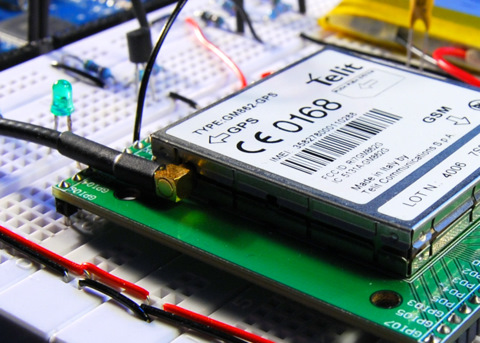
The Arduino can talk over a wide range of networks. Ethernet, Bluetooth, Wifi, XBEE and GPRS to name the most known. I had a Telit GM862-GPS module laying around, unused for some time already. It has GPRS and GPS capabilities, both accessible with AT commands. So I decided to port some of my code to the Arduino.
Schematic
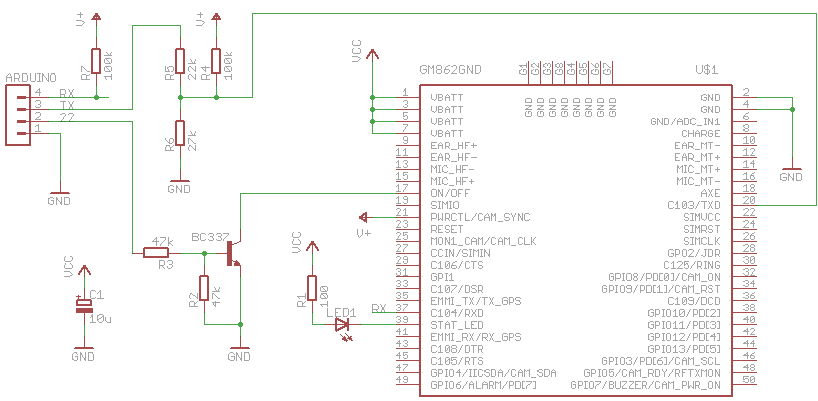
Connecting the Arduino Mega to the GM862 is rather easy. Only four connections are needed.
- Tx3 – Tx
- Rx3 – Rx
- Pin 22 – On/Off
- GND – GND
The GM862 is accessed with a breadboard fiendly breakout board from Sparkfun.
The logic pins of the GM862 accept only CMOS 2.8 Volt. For that reason, a voltage divider is needed for the Tx line. Both, Rx and Tx are pulled up to the PWR_CTL line of the module because these pins don’t have an internal pull up resistor.
The on/off line is connected to ground with a transistor.
The bad thing for this setup is the power supply. The module is powered by a LiPo cell (3.7 V with 2000 mAh). The Arduino Mega is powered by the USB port. If I want to make this portable, I have to use two batteries. Or find a better solution. Maybe powering the Arduino with a step-up converter.
Software
First I wanted to use an Arduino Pro mini, that runs on 3.3 V. That would save me from having two different power supplies for the Arduino and the GM862. I tried to connect the Rx/Tx lines to two digital pins and use the NewSoftSerial library. This library enables a second serial port on the Arduino besides the hardware serial port. Unfortunately it wasn’t reliable enough. Sending to the module seems to work well, receiving sometimes did not. I tried it with different baud rates and different Arduinos, 8 MHz and 16 MHz, but that didn’t help. Maybe I did something wrong, but I couldn’t figure it out.
So I switched to my brand new Arduino Mega. I just connected Rx/Tx to one of the hardware serial ports and it worked immediatly.
The following features are implemented:
- Starting and stopping the module
- Initialization
- Sending of SMS
- Requesting GPS position and parsing the result
- Opening a socket, writing and reading (used to talk HTTP) over GPRS
The software is an really early stage. I focussed most on functionality and less on performance or compact code. The following todos are still open:
- Make debugging output configurable
- Use of PROGMEM to reduce RAM usage
- More compact structure for AT commands
- Parse more responses of AT commands. Some are simply issued, without looking at the response
Nevertheless, here is a small snippet, that shows features that are already working. To get it working, you have to replace XXXX with your PIN. For GPRS you have to dig into the module code and adapt the GPRS settings.
/*
 * GM862-GPS testing sketch
 * used with Arduino Mega
 * http://tinkerlog.com
 */

#include "GM862.h"

int onPin = 22;                      // pin to toggle the modem's on/off
char PIN[5] = "XXXX";                // replace this with your PIN
Position position;                   // stores the GPS position
GM862 modem(&Serial3, onPin, PIN);   // modem is connected to Serial3
char cmd;                            // command read from terminal


void setup() {
  delay(10000);
  Serial.begin(19200);
  Serial.println("GM862 monitor");
  modem.switchOn();                   // switch the modem on
  delay(4000);                        // wait for the modem to boot
  modem.init();                       // initialize the GM862
  modem.version();                    // request modem version info
  while (!modem.isRegistered()) {
    delay(1000);
    modem.checkNetwork();             // check the network availability
  }
  Serial.println("---------------------");
  Serial.println("ready");
}


void requestHTTP() {
  char buf[100];
  byte i = 0;
  modem.initGPRS();                   // setup of GPRS context
  modem.enableGPRS();                 // switch GPRS on
  modem.openHTTP("search.twitter.com");    // open a socket
  Serial.println("sending request ...");
  modem.send("GET /search.atom?q=gm862 HTTP/1.1rn"); // search twitter for gm862
  modem.send("HOST: search.twitter.com portrn");     // write on the socket
  modem.send("rn");
  Serial.println("receiving ...");
  while (i++  0) {            // we received something
      Serial.print("buf:"); Serial.println(buf);
      i--;                            // reset the timeout
    }
  }
  Serial.println("done");
  modem.disableGPRS();                // switch GPRS off
}


void loop() {
  if (Serial.available()) {
    cmd = Serial.read();
    switch (cmd) {
    case 'o':
      modem.switchOff();              // switch the modem off
      break;
    case 's':                         // send a SMS. Replace with your number
      modem.sendSMS("6245", "your@email.com hello from arduino");
      break;
    case 'w':
      modem.warmStartGPS();           // issue a GPS warmstart
      break;
    case 'p':
      position = modem.requestGPS();  // request a GPS position
      if (position.fix == 0) {        // GPS position is not fixed
        Serial.println("no fix");
      }
      else {                          // print lat, lon, alt
        Serial.print("GPS position: ");
        Serial.print(position.lat_deg);  Serial.print(".");
        Serial.print(position.lat_min);  Serial.print(", ");
        Serial.print(position.lon_deg);  Serial.print(".");
        Serial.print(position.lon_min);  Serial.print(", ");
        Serial.println(position.alt);
      }
      break;
    case 'h':
      requestHTTP();                  // do a sample HTTP request
      break;
    default:
      Serial.println("command not recognized");
    }
  }
}
Log
Here is a log, that I recorded within the Arduino IDE. You can see, how
- the modem gets switched on
- the modem gets initialized
- the version info is requested
- it waits until the network is reachable
- a GPS position is requested
- a SMS gets send
- how a HTTP GET is issued over GPRS, it searches for gm862 on twitter
GM862 monitor
switching on
done
initializing modem ...
AT
->ok
AT+IPR=19200
->ok
AT+CMEE=2
->ok
AT+CPIN=XXXX
->ok
done
version info ...
AT+GMI
->buf: AT+GMI
Telit
OK
AT+GMM
->buf: AT+GMM
GM862-GPS
OK
AT+GMR
->buf: AT+GMR
07.02.403
OK
AT+CSQ
->buf: AT+CSQ
+CSQ: 0,0
OK
done

checking network ...
AT+CREG?
->buf: AT+CREG?
+CREG: 0,2
OK
done

checking network ...
AT+CREG?
->buf: AT+CREG?
+CREG: 0,2
OK
done

checking network ...
AT+CREG?
->buf: AT+CREG?
+CREG: 0,1
OK
done

---------------------
ready

requesting GPS position ...
AT$GPSACP
->buf: AT$GPSACP
$GPSACP: 110621.999,5333.9477N,00954.8735E,1.4,66.3,3,22.21,0.10,0.05,150509,08
OK
3
GPS position: 53.565794, 9.914568, 66

sending SMS ...
AT+CMGF=1
->ok
AT+CMGS="6245"
->not ok: AT+CMGS="6245"
>
your@email.com hello from arduino
done

initializing GPRS ...
AT+CGDCONT=1,"IP","internet","0.0.0.0",0,0
->buf:
+CMGS:  35
OK
AT+CGDCONT=1,"IP","internet","0.0.0.0",0,0
OK
AT#USERID=""
->buf: AT#USERID=""
OK
AT#PASSW=""
->buf: AT#PASSW=""
OK
done

switching GPRS on ...
AT#GPRS=1
->buf: AT#GPRS=1
+IP: 10.37.146.251
OK
done

opening socket ...
AT#SKTD=0,80,"search.twitter.com",0,0
->buf: AT#SKTD=0,80,"search.twitter.com",0,0
buf:
buf:
CONNECT
sending request ...
receiving ...
buf:HTTP/1.1 200 OK
Date: Fri, 15 May 2009 11:07:19 GMT
Server: hi
Status: 200 OK
Cache-Control: ma
buf:x-age=20, must-revalidate, max-age=1800
Content-Type: application/atom+xml; charset=utf-8
X-Serve
buf:d-By: searchweb005.twitter.com
Expires: Fri, 15 May 2009 11:37:18 GMT
Content-Length: 4757
Vary:
buf: Accept-Encoding
X-Varnish: 218274860
Age: 0
Via: 1.1 varnish
X-Cache-Svr: searchweb005.twitter
buf:.com
X-Cache: MISS
Connection: close

<?xml version="1.0" encoding="UTF-8"?>
[...]
    </author>
  </entry>
</feed>

NO CARRIER
done

switching GPRS off ...
AT#GPRS=0
->buf: AT#GPRS=0
OK
done
Outlook
Besides some software todos on the list, two things are still bugging me. One is the need of an Arduino Mega because of the hardware serial port. I will try the new version of NewSoftSerial, as soon as it is released. The other thing is the need of two power sources. But that could be solved with the Arduino Mini pro, when the software serial issue is fixed.
Everything else worked well. Now I only need a problem that could be solved with this ;) .
Links and Downloads
- Source code: arduino-gm862.zip
- Interfacing an AVR controller to a GPS Mobile Phone
- GM862 breakout board from Sparkfun
- GM862 specs at Telit.
- roundsolutions, distributor for GM862 modules.
 tinkerlog
That’s cool Alex, I’m working on something similar. I’m connecting a GPS module recovered from a broken GPS to an Asus EEE PC, to create a navigation system. Unfortunately I’m short on time, but as soon as I get some free time, I’ll post it on my blog.
LikeLike
Cool project!
I saw this: ‘Make debugging output configurable’
And could not resist linking:
http://www.arduino.cc/playground/Code/SerialDebugger
LikeLike
Thanks for the input.
That might help to clear things up.
LikeLike
Cool stuff!
I have gotten back to thinking about my Telit-related projects just last week, and decided switching to arduino might speed up the software-side of development. Did a quick search and you’ve been doing the same thing!
I’m going to work with the 3.3V / 8MHz ‘Arduino Pro’ that Sparkfun sells – this should remedy the problem of needing two voltages and a voltage divider for the UART.
Cheers,
Tom
LikeLike
Hi Tom,
if you take the Arduino Pro, you still have to take care of the 2.8V level on the logic lines of the telit. But you are right, at least you can have only one supply.
I choose the Mega mainly because it had more hardware UARTs, which makes it easier to debug.
Cheers,
Alex
LikeLike
Just out of cutiossity, when you says send a SMS, does that meen that the Arduino can actualy send an SMS to a cell phone?
LikeLike
Yes, that’s what it means.
LikeLike
Hi alex,
thanx for the great article
I got a breakout board and telit gm862 module
Connecting everything as per your diagram by making a prototyping kind of shield to fit over arduino mega and telit breakout board on top of shield
I am powering the arduino mega with usb and telit breakout board with 3.3 volt external supply
I am not getting any reponse from telit
It always says -> no reponse . any quick ideas where things must be going wrong ?
LikeLike
Hi Sumeet,
the Arduino Mega should be powered with 5V or more. I’m not sure if it would run reliable with 3.3V.
Cheers,
Alex
LikeLike
Hi alex,
I got a breakout board and telit gm862 module
Connecting everything as per your diagram by making a prototyping kind
I am not getting any reponse from telit
I send AT and anything came from the telit module
The status LED flashe a couple of times and after he keep off. Is like the module never power on.
Any clue?
LikeLike
Hi Hector,
be sure your power supply can handle peaks of about 2 amps. These are coming if the module tries to connect the network.
Cheers,
Alex
LikeLike
It should be possible to reliably use the Arduino Pro with the GM862 if you use the hardware UART for communicating with the GM862 and a softserial serial port for sending the debug messages. You would either use two TTL to serial/usb adapters (one for programming, the second for debugging) and break the hardware UART’s RX line from the main programming serial adapter after programming the Arduino (necessary to allow the GM862 control of the Arduino’s UART RX line) or use one serial adapter and move it from the programming/hardware serial port to the softserial port every time you update the Arduino program.
LikeLike
For everyone that has no luck with this.. I”ve tried this and a few other schematics with my GM862 and simply had no love at all.
I sent it back to SFE for warranty but they said it’s fine so seems this module is super sensitive.. I even checked the outputs with a CRO.
I am going to get a MAX3232 and try that since it worked on a sparkfun rs232 breakout board apparently.
Just thought I’d let you others know!
LikeLike
Very cool Alex! Thanx.
I’m a bit new to this and I trying ot understand your library GM862. Since you are using an Arduino Mega, why do you use HardwareSerial objects? and not rather Serial1 or Serial2 from the Arduino language?
Cheers, Marek
LikeLike
Because I can ;)
No seriously, the Mega has 4 serial ports in hardware. These are always preferable over serial ports in software, mostly because the software solution costs more computational power.
Cheers,
Alex
LikeLike
I agree with that hardware serial ports are better that software ones, but… my question was rather why do you use a library to have access to HardwareSerial objects… instead of using the solution provided by arduino language: Serial1
Mabe to make myself clear:
You use: GM862 modem(&Serial3, onPin, PIN);
[…] modem->print(message);
Why not, simply: Serial3.print(message); ?
Thank you for your help! Marek
LikeLike
Ah, ok, I see.
I used that to be able to connect the modem to any of the available serial ports, without having to replace every Serialx with Serialy.
LikeLike
This makes everythink clear. Thank you for your code. It has been of great help to understand how everything works. MAREK
LikeLike
hello im from brazil and a making a project like this in my curse conclusion work, but i using a siemens modem, so i use a max232 to converto to ttl, my ask is about gps position u declare “Position position” the arduino have a bibliotec about gps positions?
LikeLike
Is the telit module capable of making and receiving calls?
response would be awesome
LikeLike
Yes, it is. You can check the datasheet for more details.
LikeLike
Mario, Position is defined in GM862.h.
LikeLike
Great stuff! :) I’ve just been researching the 862 as a module of a project, likely to be paired with the Arduino Mega, too. Kind of going OnStar-ish. Glad to see your progress.
LikeLike
Hi Alex,
This page that you made is sooooooo helpful!! Thanks a lot, but I have a question though. When I put the ON signal to the telit, I am supposed to wait until a message “DONE” is received or what message is received when it is turned on successfully?
One last thing, as I connected the module to the 3.3 volt, there was a led on the mikroelektonika board that turned on, and for the on signal I just put a a grounded push button, and then I clicked on it for more than one second and then removed my hand. But no luck when I try to call the module as the operator says that the phone is turned off or not available. so is there like a special command that I should send after I turn it on or what?
Thanks!
LikeLike
Hi manson,
the code does not really check, if the modem gets turned on, it just pulls the ON/OFF line down.
Switching in on with a simple button should work, maybe 3.3V is not enough, the modem is specified for about 3.7V.
Cheers,
Alex
LikeLike
Thanks Alex for your fast reply,
I did as you told me and I connected 3.8v to the module, and I also connected the STATUS_LED to 1 kohm and then to the 3.8v but when I plug in the power, and press on the switch for 1 to 2 seconds and release the STATUS_LED doesn’t flash at all, does this happen to you as well or not??
And how can I connect the PWRMON pin to a LED to see if the module even turned on or not??
THANKS MAN!!
LikeLike
Once Again!!
I did a mistake, as I connected a 1kohm with the LED… HOW STUPID AM I!! :D :D
Now, when I put the ON Signal low for one second the the LED_STATUS goes blinking……
AWESOME
But it blinks for 5 or 8 times and then after that it turns off. And in the datasheet it says it should blink every 3 seconds.. So what is wrong here???
YOU ARE THE MAN ALEX!!!
THANKS soo much for your help
LikeLike
Hi manson,
after starting the module, it tries to connect to the GSM station. For that it needs up to 2 A. If your battery is not able to supply that current, the module turns off.
Cheers,
Alex
LikeLike
Hi,
Does anyone know if there is a source of cheaper breakout board (inc. connector) for GM862-GPS compared to Sparkfun’s ?
LikeLike
Hi,
I got a breakout board from Sparkfun and a GM862-GPS and try a simplest circuit to see if it boot up. The test configuration has 3.8V power supply (current limit at 3A) connect to Vcc, all other pin are open and a switch is connect from On/Off to ground. It doesn’t run when I push the switch (current is still zero). I also try the same test config with DTR pull-up and RTS pull-down by 1Kohm (to mimic the behavior on eval board), but the module still doesn’t run. The same GM862GPS module works OK on Sparkfun USB eval board. If I use the USB eval board as a stand-alone and feed 3.8V to Vcc pin, everything is OK (power suplly shows about 40-70mA idle). Does anyone know what could be the problem? Does it mean the connector on the breakout board is bad (it’s a brand new one I just got from Sparkfun)?
Thanks a lot and happy tinkering,
Cheers
Seymour
LikeLike
Hi Seymour,
do you have all VCC and GND pins connected?
Cheers,
Alex
LikeLike
I got the breakout board up and running. The culprit is a tiny piece of tape sticking inside the connector. I guess this is what called “vacuum pick-up tape”. The USB eval board doesn’t have it (both board came in the same box), the breakout board does. After removing it everything is OK.
Does anyone know a source of cheaper breakout board ($30 is a bit high and I need a few dozens) and cheap GM862, with and without GPS?
A more general question is that if we have a new design with GSM and/or GPS now, which options should we use? Out of GM862, I’m also playing with Libelium Arduino GSM shield (based on Sagem Hilo module) and a few GPS modules (MTK, SIRF, Skytraq chipset) from Sparkfun and others. The size of Sagem Hilo is amazing (~1/3 the surface of GM862) but again, with my limited soldering and PCB skill I will need breakout board for it too if I decide to go with it.
Thanks all and happy tinkering,
Cheers,
Seymour
LikeLike
Hi
thanks alot for this topic
I have one problem after connecting everything
the led blinks after turning it on for 6-9 times and it shutdown directly after that
I supplied 3.8v and the current around 2.2 A
I am afraid of connecting it to more current because I didn’t find the maxcurrent in the gm862 dtasheet
so is it a power problem!
can you please suggest something to fix this problem?
Thanks again
LikeLike
Hi James,
another thing that often goes wrong, it the capacitor behind your regulator. This one has to have a low ESR value to be able to supply the current fast enough.
Cheers,
Alex
LikeLike
Hi,
I wanted to try this code (I use arduino 0017) but I can’t compile it? I get this:
o: In function `GM862::isOn()’:
multiple definition of `GM862::isOn()
Any idea what went wrong? By the way, if I don’t want to use serial “feedback”, can I write the responds to a LCD so I don’t need arduino mega?
Regards,
Peter
LikeLike
Hi Peter,
works for me, just re-verified (on OSX).
Maybe accidently mangled one of the include lines?
And yes, it should be possible to use a Duemilanove, but then you have to rewire your setup for every upload.
Cheers,
Alex
LikeLike
Hi Alex,
Did you already try the same with the newest NewSoftSerial library (instead of 2 hardware serial ports)? Would be very interesting! What changes are necessary in your code when using this?
Best wishes,
3dotter
LikeLike
Hi 3dotter,
no, I’m sorry, haven’t tried that yet.
Cheers,
Alex
LikeLike
Hi , could i use an Arduino duemilanove with this scheme? I have to change serial3 with serial , it is right or i am costrettoforced to use an Arduino mega?thanks Donato
LikeLike
Hi Alex,
Same that Peter, I ‘m trying the code (I use arduino 0017) I get this: o: In function `GM862::isOn()’:
multiple definition of `GM862::isOn() /tmp/build6991673787891400230.tmp/test_gm862/GM862.cpp.o:/home/me/Desktop/arduino-0017/hardware/libraries/test_gm862/GM862.cpp:12: first defined here
Any idea what went wrong?
I’m using too an Arduino mega and a telit gm862 gps.
Thanks for your help.
Franck
LikeLike
Hi Franck,
I think I know what went wrong. Although this looks like a lib, it is not. Well, it could be.
Please place all files in another directory (not in /arduino/hardware/libraries) and it should compile fine.
Maybe, if I find some time, I will make it a real library.
Cheers,
Alex
LikeLike
Hi, great work.
what are V+ and Vcc in the diagram.
I don`t know to wich power source must connected.
Thanks
LikeLike
Hi, i am not able to connect my arduino mega to GM82. Could you explaine me the difference between V+ and Vcc because i receive always
checking network …
AT+CREG?
->buf: AT+CREG?
+CREG: 0,2
OK
done
checking network …
AT+CREG?
->buf: AT+CREG?
+CREG: 0,2
OK
done
I don’t understand what the problem is.
LikeLike
All V+ lines are connected to pin 21 of the Telit module. VCC is connected to a 3.8 V power supply (lipo cell).
For the CREG problem, is the network available if you put the SIM into your mobile?
LikeLike
Hi Alex,
I was wondering if you knew how to change this line of your code:
GM862 modem(&Serial3, onPin, PIN);
so that it can be used on an arduino duemilanove. I know there is only one hardware serial port on this board, so I tried replacing “&Serial3” with &Serial, Serial, &Serial0 but I cant seem to find the correct syntax.
Thanks in advace for your help.
LikeLike
Hi Alejandro,
GM862 modem(&Serial, onPin, PIN);
works for me.
Cheers,
Alex
LikeLike
When I try that, I receive the following error message:
o: In function `main’:
undefined reference to `GM862::GM862(HardwareSerial*, unsigned char, char*)’
Any ideas what I could be doing wrong?
Thanks
LikeLike